在现代 Web 开发中,跨域资源共享(CORS)是前端与后端联调时最常见的问题。该问题由浏览器的同源策略安全机制引发,Nginx 作为反向代理服务器,可通过配置 HTTP 响应头快速、优雅地解决跨域问题,无需修改后端业务代码,是生产环境的最优解决方案。
同源策略是浏览器内置的核心安全机制,用于限制不同源之间的资源交互,防范 XSS、CSRF 等攻击。
两个地址满足 协议 + 域名 + 端口号 完全一致,才属于同源;任意一项不同,均判定为跨域。
禁止跨域操作 DOM 元素
禁止跨域发送 Ajax / Fetch 请求
禁止跨域访问 Cookie、LocalStorage 等客户端存储数据
当前端页面与后端接口的源不一致时,浏览器会拦截请求并抛出跨域报错。
<!DOCTYPE html>
<html lang="en">
<head>
    <meta charset="UTF-8">
    <title>跨域测试</title>
</head>
<body>
    <div>Nginx Response: <span id="message"></span></div>
    <script>
        // 跨域请求后端接口
        fetch('http://192.168.60.139/hi')
            .then(res => res.text())
            .then(data => document.getElementById('message').innerHTML = data)
            .catch(err => console.error('跨域错误:', err));
    </script>
</body>
</html>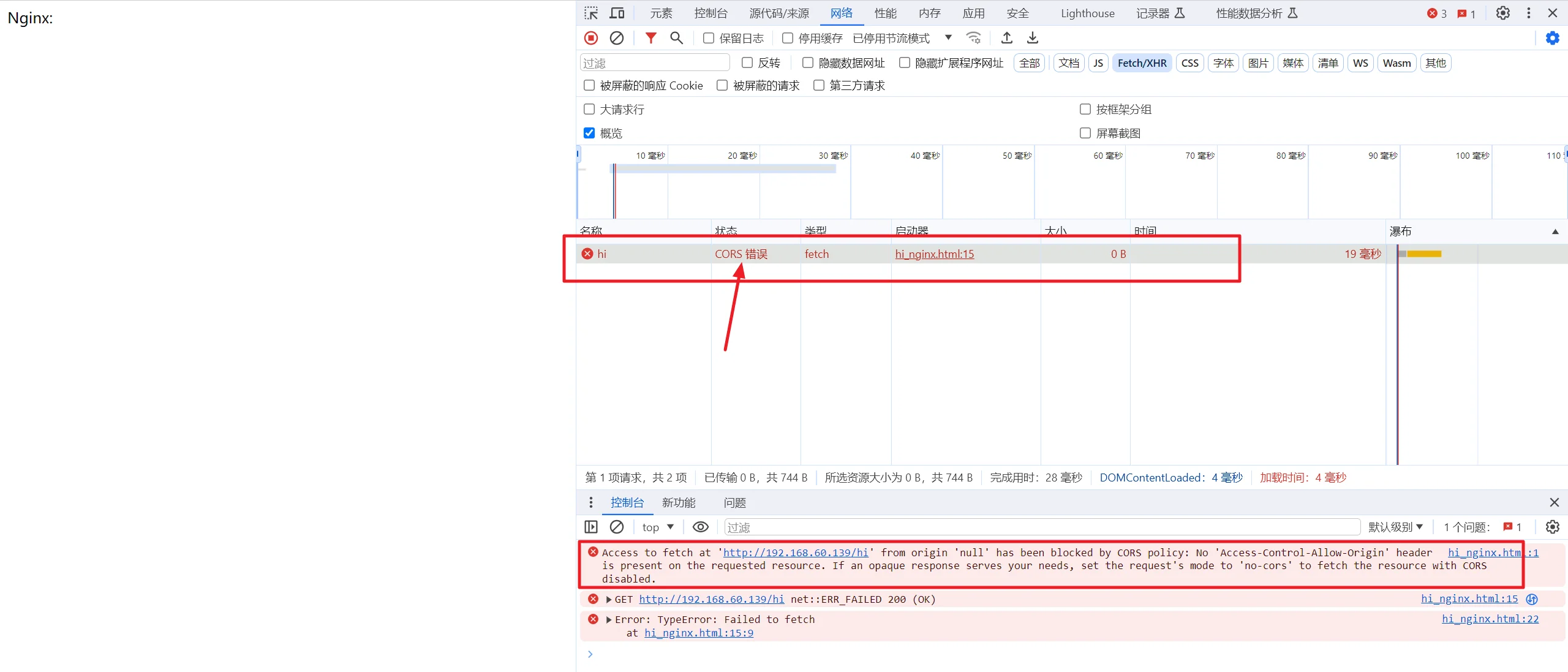
Nginx 通过在响应中添加 CORS 标准 HTTP 头 解决跨域,修复原文档关键缺陷:add_header 默认仅对 200/204 等状态码生效,必须添加 always 参数,确保 4xx/5xx 异常状态码也能返回跨域头。
开发环境,允许所有源
适用于本地开发,简单快捷:
server {
    listen 80;
    server_name your.domain.com;

    location / {
        # 代理转发后端服务
        proxy_pass http://backend_server;
        proxy_set_header Host $host;
        proxy_set_header X-Real-IP $remote_addr;
        proxy_set_header X-Forwarded-For $proxy_add_x_forwarded_for;

        # 核心:允许所有源跨域,always 强制所有状态码生效
        add_header Access-Control-Allow-Origin * always;
        add_header Access-Control-Allow-Methods GET,POST,PUT,DELETE,OPTIONS always;
        add_header Access-Control-Allow-Headers * always;

        # 处理 OPTIONS 预检请求
        if ($request_method = OPTIONS) {
            add_header Access-Control-Max-Age 1728000;
            return 204;
        }
    }
}生产环境,指定允许源
生产环境禁止使用 *,存在安全风险,仅允许指定域名跨域:
add_header Access-Control-Allow-Origin "https://www.xxx.com" always;前端需要传递 Cookie 时,不允许使用 *,必须指定域名:
location / {
    proxy_pass http://backend_server;

    # 允许指定源
    add_header Access-Control-Allow-Origin "https://www.xxx.com" always;
    # 允许携带凭证
    add_header Access-Control-Allow-Credentials true always;
    add_header Access-Control-Allow-Methods GET,POST,PUT,DELETE,OPTIONS always;
    add_header Access-Control-Allow-Headers * always;

    if ($request_method = OPTIONS) {
        return 204;
    }
}Access-Control-Allow-Origin:允许跨域的源地址,* 代表所有,生产环境建议指定域名
Access-Control-Allow-Methods:允许的跨域请求方法
Access-Control-Allow-Headers:允许的自定义请求头
Access-Control-Allow-Credentials:是否允许携带 Cookie 等凭证
Access-Control-Max-Age:预检请求缓存时间,单位秒,减少重复预检
always:强制所有 HTTP 状态码返回响应头(必加)
@RestController
public class HelloController {
    @GetMapping("/hi")
    public String sayHello() {
        return "Hello from Backend!";
    }
}upstream backend_server {
server 127.0.0.1:8080;
}
server {
listen 80;
server_name your.domain.com;
location / {
# 反向代理
proxy_pass http://backend_server;
proxy_set_header Host $host;
proxy_set_header X-Real-IP $remote_addr;
proxy_set_header X-Forwarded-For $proxy_add_x_forwarded_for;
# CORS 跨域配置
add_header Access-Control-Allow-Origin * always;
add_header Access-Control-Allow-Methods GET,POST,OPTIONS,PUT,DELETE always;
add_header Access-Control-Allow-Headers Content-Type,Authorization always;
# 处理预检请求
if ($request_method = OPTIONS) {
add_header Access-Control-Max-Age 86400;
return 204;
}
}
}