Nginx 反向代理是使用率极高的核心功能,可将 Nginx 作为前置服务端接收全部客户端请求,依照预设规则转发请求至后端真实业务服务集群。该部署模式不仅能够提升整套系统的可用性与响应速度,还具备多元化实用价值,也是当下 Web 服务架构中主流的部署方案。
负载均衡:依托轮询、最少连接数、IP 哈希等流量分发策略,合理调度服务流量,充分利用服务器硬件资源。
高可用性:自动识别故障后端节点并临时剔除,将请求分流至其余健康服务节点,规避单点宕机导致的业务中断。
安全隔离:以 Nginx 作为网络访问边界,隐藏后端服务器内网地址与端口信息,同时统一承接 SSL / TLS 加密解密工作,减轻后端业务服务运行压力。
缓存加速:对静态资源、可缓存动态响应内容进行本地临时缓存,直接响应重复客户端请求,大幅降低后端服务访问压力,提升访问速率。
请求灵活处理:在请求转发前后自由修改请求头、请求 URL 等内容,同时可二次调整后端服务返回的响应数据,适配不同业务服务之间的数据交互规则。
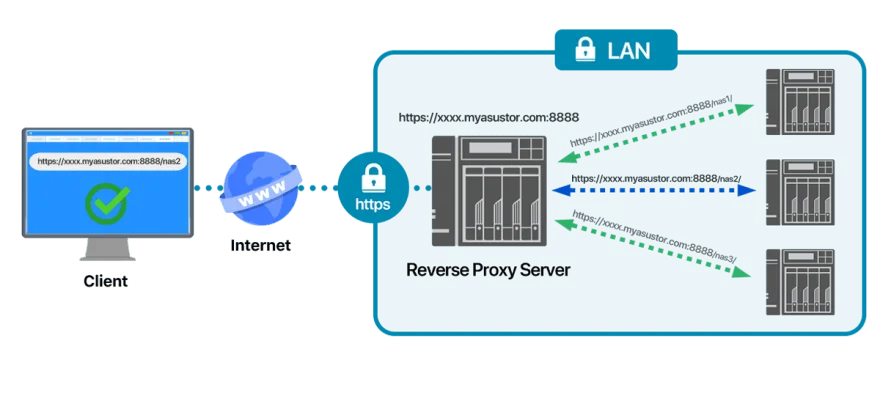
实现将访问 www.example.com 的所有客户端请求,转发至本机 8080 端口运行的业务应用。
编辑站点独立配置文件
sudo vi /etc/nginx/conf.d/default.conf写入完整反向代理配置
server {
    listen 80;
    server_name www.example.com;

    location / {
        # 转发至本地 8080 端口后端服务
        proxy_pass http://localhost:8080;
        # 传递客户端真实访问域名
        proxy_set_header Host $host;
        # 传递客户端真实 IP 地址
        proxy_set_header X-Real-IP $remote_addr;
        # 拼接多层代理场景下完整客户端 IP 链路
        proxy_set_header X-Forwarded-For $proxy_add_x_forwarded_for;
        # 适配 WebSocket 长连接代理场景
        proxy_set_header Upgrade $http_upgrade;
        proxy_set_header Connection "upgrade";
        # 指定代理使用 HTTP 1.1 协议,适配长连接
        proxy_http_version 1.1;
    }
}
保存文件并退出编辑模式
搭建本地服务代理访问百度站点,适用于内网环境外网资源中转场景。
编辑 Nginx 站点配置文件
sudo vi /etc/nginx/conf.d/default.conf写入外网代理配置
server {
    listen 80;
    server_name localhost;

    location / {
        # 转发至百度官方 HTTPS 站点
        proxy_pass https://www.baidu.com;
        # 固定传递目标站点域名,避免域名解析异常
        proxy_set_header Host www.baidu.com;
        proxy_set_header X-Real-IP $remote_addr;
        proxy_set_header X-Forwarded-For $proxy_add_x_forwarded_for;
        proxy_set_header Upgrade $http_upgrade;
        proxy_set_header Connection "upgrade";
    }
}
保存配置完成编辑。
修改 Nginx 所有配置后,优先执行语法检测,避免配置错误导致服务异常
sudo nginx -t出现 test is successful 代表配置语法无误。
无需重启 Nginx 服务,平滑加载最新配置,不中断线上业务访问
sudo nginx -s reload实时查看请求转发状态,排查代理转发异常问题
sudo tail -n +1 -f /var/log/nginx/access.log浏览器访问 http://www.example.com,确认页面正常跳转至本地 8080 端口业务应用页面。
浏览器访问 http://localhost,确认页面正常加载百度站点页面内容。
通过 Docker Compose 一键部署 Nginx 代理服务与 Spring Boot 后端服务
services:
  web:
    image: nginx:1.26.2-alpine
    restart: always
    container_name: web
    environment:
      NGINX_HOST: localhost
      NGINX_PORT: 80
    ports:
      - 80:80
    volumes:
      - ./nginx.conf:/etc/nginx/nginx.conf
      - ./web.conf:/etc/nginx/conf.d/web.conf
      - ./dist:/usr/share/nginx/html

  backend:
    image: eclipse-temurin:17-jre-alpine
    restart: always
    container_name: backend
    environment:
      TZ: Asia/Shanghai
    ports:
      - 8080:8080
    volumes:
      - /etc/timezone:/etc/timezone
      - /etc/localtime:/etc/localtime
      - ./hello-nginx-0.0.1-SNAPSHOT.jar:/home/hello-nginx-0.0.1-SNAPSHOT.jar
    command: >
      /bin/sh -c 'sleep 5; java -jar /home/hello-nginx-0.0.1-SNAPSHOT.jar'
配置说明
web 服务:映射主机 80 端口,通过数据卷挂载本地 Nginx 主配置、站点代理配置以及前端静态资源文件,实现配置与容器解耦。
backend 服务:统一配置亚洲上海时区,延迟 5 秒启动 Java 项目,优先等待网络与容器环境初始化完成,避免项目启动失败。
适配 Linux 主流服务器环境,兼容 Nginx 1.20 及以上所有新版本
user nginx;
worker_processes auto;
error_log /var/log/nginx/error.log info;
pid /var/run/nginx.pid;

events {
    worker_connections 1024;
    use epoll;
    multi_accept on;
}

http {
    include       mime.types;
    default_type  application/octet-stream;
    log_format  main  '$remote_addr - $remote_user [$time_local] "$request" '
                      '$status $body_bytes_sent "$http_referer" '
                      '"$http_user_agent" "$http_x_forwarded_for"';
    access_log  /var/log/nginx/access.log main;
    sendfile        on;
    keepalive_timeout 65;

    # 统一引入所有站点代理配置
    include /etc/nginx/conf.d/*.conf;
}适配 Docker 容器互联场景,直接转发请求至容器内后端服务
server {
    listen 80;
    server_name localhost;

    location / {
        proxy_pass http://backend:8080;
        proxy_set_header Host $host;
        proxy_set_header X-Real-IP $remote_addr;
        proxy_set_header X-Forwarded-For $proxy_add_x_forwarded_for;
        proxy_set_header Upgrade $http_upgrade;
        proxy_set_header Connection "upgrade";
        proxy_http_version 1.1;
    }
}proxy_pass http://127.0.0.1:8080 无末尾斜杠
客户端请求 /api/test,转发后端地址为 http://127.0.0.1:8080/api/test,完整拼接请求路径
proxy_pass http://127.0.0.1:8080/ 带末尾斜杠
客户端请求 /api/test,转发后端地址为 http://127.0.0.1:8080/test,自动截断匹配前缀路径
添加至 location 内部,解决后端接口响应缓慢导致的代理超时报错
# 连接后端服务超时时间
proxy_connect_timeout 10s;
# 读取后端响应数据超时时间
proxy_read_timeout 120s;
# 向后端发送请求数据超时时间
proxy_send_timeout 120s;配置后端节点异常时自动重试机制,提升服务容错性
# 出现连接超时、服务宕机等异常时跳转下一个节点
proxy_next_upstream error timeout invalid_header http_500 http_502 http_503;