Pure Admin
# 完整版前端代码
git clone https://ghfast.top/https://github.com/pure-admin/vue-pure-admin.git

# 非国际化精简版前端代码
git clone https://ghfast.top/https://github.com/pure-admin/pure-admin-thin.gitCrmeb Java
# 官方案例地址
https://admin.java.crmeb.net/

# 开源版 v1.4 代码
git clone https://gitee.com/ZhongBangKeJi/crmeb_java.git使用 Docker Compose 部署 MySQL 8.x
services:
  mysql:
    image: mysql:8.0
    container_name: mysql
    restart: always
    environment:
      MYSQL_ROOT_PASSWORD: 123456
      TZ: Asia/Shanghai
    command:
      - --default-authentication-plugin=mysql_native_password
      - --character-set-server=utf8mb4
      - --collation-server=utf8mb4_unicode_ci
      - --lower_case_table_names=1
    ports:
      - "3306:3306"
    volumes:
      - ./mysql_data:/var/lib/mysql
部署成功后创建一个名为 mycrmeb 的数据库,暂时不用建表
新建项目目录,起个项目名字,如 mycrmeb
进入项目目录,使用 git init 命令初始化项目
创建 .gitignore
*.class

# Package Files #
*.jar
*.war
*.ear
target/

# eclipse
.settings/
.classpath
.project
logs/

# idea
.idea/
*.iml

*velocity.log*

### STS ###
.apt_generated
.factorypath
.springBeans

### IntelliJ IDEA ###
.idea
*.iws
*.ipr

### NetBeans ###
nbproject/private/
build/
nbbuild/
dist/
nbdist/
.nb-gradle/

*.log
tmp/
在项目根目录创建两个目录
前端代码:frontend
后端代码:backend
在 backend 目录下创建 pom.xml
<?xml version="1.0" encoding="UTF-8"?>
<project xmlns="http://maven.apache.org/POM/4.0.0" xmlns:xsi="http://www.w3.org/2001/XMLSchema-instance"
         xsi:schemaLocation="http://maven.apache.org/POM/4.0.0 https://maven.apache.org/xsd/maven-4.0.0.xsd">
    <modelVersion>4.0.0</modelVersion>

    <parent>
        <groupId>org.springframework.boot</groupId>
        <artifactId>spring-boot-starter-parent</artifactId>
        <version>3.5.13</version>
        <relativePath/> <!-- lookup parent from repository -->
    </parent>

    <groupId>com.lusifer</groupId>
    <artifactId>mycrmeb</artifactId>
    <version>0.0.1-SNAPSHOT</version>

    <name>mycrmeb</name>

    <properties>
        <java.version>17</java.version>
        <mybatis-plus.version>3.5.16</mybatis-plus.version>
        <dynamic-datasource.version>4.5.0</dynamic-datasource.version>
        <p6spy.version>3.9.1</p6spy.version>
        <hutool.version>5.8.44</hutool.version>
        <druid.version>1.2.28</druid.version>
        <knife4j.version>4.5.0</knife4j.version>
    </properties>

    <dependencies>
        <!-- Spring Boot -->
        <dependency>
            <groupId>org.springframework.boot</groupId>
            <artifactId>spring-boot-starter-web</artifactId>
        </dependency>
        <dependency>
            <groupId>org.springframework.boot</groupId>
            <artifactId>spring-boot-starter-actuator</artifactId>
        </dependency>
        <dependency>
            <groupId>org.springframework.boot</groupId>
            <artifactId>spring-boot-starter-validation</artifactId>
        </dependency>

        <!-- Database -->
        <dependency>
            <groupId>com.mysql</groupId>
            <artifactId>mysql-connector-j</artifactId>
            <scope>runtime</scope>
        </dependency>
        <dependency>
            <groupId>com.baomidou</groupId>
            <artifactId>mybatis-plus-spring-boot3-starter</artifactId>
            <version>${mybatis-plus.version}</version>
        </dependency>
        <dependency>
            <groupId>com.baomidou</groupId>
            <artifactId>mybatis-plus-jsqlparser</artifactId>
            <version>${mybatis-plus.version}</version>
        </dependency>
        <dependency>
            <groupId>com.baomidou</groupId>
            <artifactId>dynamic-datasource-spring-boot3-starter</artifactId>
            <version>${dynamic-datasource.version}</version>
        </dependency>
        <dependency>
            <groupId>p6spy</groupId>
            <artifactId>p6spy</artifactId>
            <version>${p6spy.version}</version>
        </dependency>
        <dependency>
            <groupId>com.alibaba</groupId>
            <artifactId>druid-spring-boot-3-starter</artifactId>
            <version>${druid.version}</version>
        </dependency>

        <!-- Tools -->
        <dependency>
            <groupId>cn.hutool</groupId>
            <artifactId>hutool-all</artifactId>
            <version>${hutool.version}</version>
        </dependency>
        <dependency>
            <groupId>org.projectlombok</groupId>
            <artifactId>lombok</artifactId>
            <optional>true</optional>
        </dependency>
        <dependency>
            <groupId>org.springframework.boot</groupId>
            <artifactId>spring-boot-devtools</artifactId>
            <scope>runtime</scope>
            <optional>true</optional>
        </dependency>
        <dependency>
            <groupId>org.springframework.boot</groupId>
            <artifactId>spring-boot-starter-test</artifactId>
            <scope>test</scope>
        </dependency>

        <dependency>
            <groupId>com.github.xiaoymin</groupId>
            <artifactId>knife4j-openapi3-jakarta-spring-boot-starter</artifactId>
            <version>${knife4j.version}</version>
        </dependency>
    </dependencies>

    <build>
        <plugins>
            <plugin>
                <groupId>org.apache.maven.plugins</groupId>
                <artifactId>maven-surefire-plugin</artifactId>
                <configuration>
                    <skip>true</skip>  <!-- 永久跳过测试 -->
                </configuration>
            </plugin>
            <plugin>
                <groupId>org.springframework.boot</groupId>
                <artifactId>spring-boot-maven-plugin</artifactId>
                <configuration>
                    <excludes>
                        <exclude>
                            <groupId>org.projectlombok</groupId>
                            <artifactId>lombok</artifactId>
                        </exclude>
                    </excludes>
                </configuration>
            </plugin>
            <plugin>
                <groupId>org.apache.maven.plugins</groupId>
                <artifactId>maven-compiler-plugin</artifactId>
                <executions>
                    <execution>
                        <id>default-compile</id>
                        <phase>compile</phase>
                        <goals>
                            <goal>compile</goal>
                        </goals>
                        <configuration>
                            <annotationProcessorPaths>
                                <path>
                                    <groupId>org.projectlombok</groupId>
                                    <artifactId>lombok</artifactId>
                                </path>
                            </annotationProcessorPaths>
                        </configuration>
                    </execution>
                    <execution>
                        <id>default-testCompile</id>
                        <phase>test-compile</phase>
                        <goals>
                            <goal>testCompile</goal>
                        </goals>
                        <configuration>
                            <annotationProcessorPaths>
                                <path>
                                    <groupId>org.projectlombok</groupId>
                                    <artifactId>lombok</artifactId>
                                </path>
                            </annotationProcessorPaths>
                        </configuration>
                    </execution>
                </executions>
            </plugin>
        </plugins>
    </build>

</project>
在 backend 目录下创建
src/main/java
src/main/resources
src/test/java
按开发规则创建包,域名反转,如
# 域名反转 + 项目名
com.lusifer.crmeb
创建分层架构标准包接口
entity
mapper
service
controller在 src/main/resources 目录下创建 application.yml
server:
  port: 8080

spring:
  application:
    name: mycrmeb
    version: 1.0.0
  main:
    allow-bean-definition-overriding: true
  datasource:
    # 使用阿里的 Druid 连接池
    type: com.alibaba.druid.pool.DruidDataSource
    url: jdbc:mysql://192.168.203.128:3306/mycrmeb?useUnicode=true&characterEncoding=utf8&serverTimezone=Asia/Shanghai&useSSL=false
    username: root
    password: 123456
    driver-class-name: com.mysql.cj.jdbc.Driver
    druid:
      stat-view-servlet:
        # 开启 Druid 监控面板
        enabled: true
        # 监控面板访问路径
        url-pattern: /druid/*
        # 允许重置监控数据
        reset-enable: true
        # 监控面板登录用户名
        login-username: admin
        # 监控面板登录密码
        login-password: admin
      # Web 监控过滤器
      web-stat-filter:
        enabled: true
        url-pattern: /*
        exclusions: "*.js,*.css,/druid/*"
      # Spring 监控
      aop-patterns: com.lusifer.crmeb.service.*,com.lusifer.crmeb.mapper.*
      # 初始化连接数
      initial-size: 10
      # 最大活跃连接数
      max-active: 20
      # 最小空闲连接数
      min-idle: 1
      # 获取连接的最大等待时间,单位:毫秒
      max-wait: 60000
      # 空闲连接校验的时间间隔,单位:毫秒
      time-between-eviction-runs-millis: 60000
      # 连接最小空闲时间,单位:毫秒
      min-evictable-idle-time-millis: 300000
      # 空闲时是否校验连接有效性
      test-while-idle: true
      # 获取连接时是否校验有效性
      test-on-borrow: true
      # 归还连接时是否校验有效性
      test-on-return: false
      # 开启预处理语句池
      pool-prepared-statements: true
      # 连接有效性校验 SQL
      validation-query: SELECT 1
      # 校验超时时间,单位:秒
      validation-query-timeout: 500
      # 过滤器配置:stat=监控统计,wall=SQL 防火墙
      filters: stat,wall

# 打印 SQL 日志
mybatis-plus:
  # 配置 Mapper XML 文件的扫描路径
  mapper-locations: classpath*:/mapper/**/*.xml
  # 配置实体类别名包,简化 XML 中 resultType 写法
  type-aliases-package: com.lusifer.crmeb.entity
  configuration:
    log-impl: org.apache.ibatis.logging.stdout.StdOutImpl
  global-config:
    db-config:
      logic-delete-field: delFlag # 全局逻辑删除字段名(delFlag 为实体类属性名称)
      logic-delete-value: 1 # 逻辑已删除值。可选,默认值为 1
      logic-not-delete-value: 0 # 逻辑未删除值。可选,默认值为 0


springdoc:
  # Swagger UI 相关配置
  swagger-ui:
    path: /swagger-ui.html
    # 标签按字母顺序排序
    tags-sorter: alpha
    # 接口按字母顺序排序
    operations-sorter: alpha
  # API 文档元数据接口路径
  api-docs:
    path: /v3/api-docs
  # 分组配置,这里先配置默认分组
  group-configs:
    - group: 'default'
      # 匹配所有路径
      paths-to-match: '/**'
      # 扫描 Controller 所在的包,替换为你自己的包路径
      packages-to-scan: com.lusifer.crmeb.controller

# Knife4j 增强配置
knife4j:
  # 开启 Knife4j 增强功能
  enable: true
  # 基础配置
  setting:
    # 设置界面语言为中文
    language: zh_cn
    # 开启调试功能
enable-debug: true按照规则【项目名 + Application】,创建名为 CrmebApplication 的入口类
package com.lusifer.crmeb;

import org.mybatis.spring.annotation.MapperScan;
import org.springframework.boot.SpringApplication;
import org.springframework.boot.autoconfigure.SpringBootApplication;

@SpringBootApplication
@MapperScan("com.lusifer.crmeb.mapper")
public class CrmebApplication {
  public static void main(String[] args) {
    SpringApplication.run(CrmebApplication.class, args);
  }
}在 src/main/resources 目录下创建 banner.txt
生成 ASCII 艺术字 时,可以使用 Standard 字体,同官方效果
参考内容如下
 __  __        ____                     _
|  \/  |_   _ / ___|_ __ _ __ ___   ___| |__
| |\/| | | | | |   | '__| '_ ` _ \ / _ \ '_ \
| |  | | |_| | |___| |  | | | | | |  __/ |_) |
|_|  |_|\__, |\____|_|  |_| |_| |_|\___|_.__/
        |___/
Spring Boot:v${spring-boot.version}
MyCrmeb 智慧电商平台 v${spring.application.version}按照以上流程进行测试,如果能够启动服务,表示初步创建过程完成
复制前端模板到 frontend 目录下
修改 package.json 参考如下,删除了一些无用信息,修改了项目名和版本号
{
  "name": "mycrmeb-admin-vue",
  "version": "1.0.0",
  "private": true,
  "type": "module",
  "scripts": {
    "dev": "NODE_OPTIONS=--max-old-space-size=4096 vite",
    "serve": "pnpm dev",
    "build": "rimraf dist && NODE_OPTIONS=--max-old-space-size=8192 vite build",
    "build:staging": "rimraf dist && vite build --mode staging",
    "report": "rimraf dist && vite build",
    "preview": "vite preview",
    "preview:build": "pnpm build && vite preview",
    "typecheck": "tsc --noEmit && vue-tsc --noEmit --skipLibCheck",
    "svgo": "svgo -f . -r",
    "clean:cache": "rimraf .eslintcache && rimraf pnpm-lock.yaml && rimraf node_modules && pnpm store prune && pnpm install",
    "lint:eslint": "eslint --cache --max-warnings 0  \"{src,mock,build}/**/*.{vue,js,ts,tsx}\" --fix",
    "lint:prettier": "prettier --write  \"src/**/*.{js,ts,json,tsx,css,scss,vue,html,md}\"",
    "lint:stylelint": "stylelint --cache --fix \"**/*.{html,vue,css,scss}\" --cache-location node_modules/.cache/stylelint/",
    "lint": "pnpm lint:eslint && pnpm lint:prettier && pnpm lint:stylelint",
    "prepare": "husky",
    "preinstall": "npx only-allow pnpm"
  },
  "dependencies": {
    "@pureadmin/descriptions": "^1.2.1",
    "@pureadmin/table": "^3.3.0",
    "@pureadmin/utils": "^2.6.2",
    "@vueuse/core": "^14.0.0",
    "@vueuse/motion": "^3.0.3",
    "animate.css": "^4.1.1",
    "axios": "^1.12.2",
    "dayjs": "^1.11.18",
    "echarts": "^6.0.0",
    "element-plus": "^2.11.5",
    "js-cookie": "^3.0.5",
    "localforage": "^1.10.0",
    "mitt": "^3.0.1",
    "nprogress": "^0.2.0",
    "path-browserify": "^1.0.1",
    "pinia": "^3.0.3",
    "pinyin-pro": "^3.27.0",
    "qs": "^6.14.0",
    "responsive-storage": "^2.2.0",
    "sortablejs": "^1.15.6",
    "vue": "^3.5.22",
    "vue-router": "^4.6.3",
    "vue-tippy": "^6.7.1",
    "vue-types": "^6.0.0"
  },
  "devDependencies": {
    "@commitlint/cli": "^20.1.0",
    "@commitlint/config-conventional": "^20.0.0",
    "@commitlint/types": "^20.0.0",
    "@eslint/js": "^9.38.0",
    "@faker-js/faker": "^10.1.0",
    "@iconify/json": "^2.2.400",
    "@iconify/vue": "4.2.0",
    "@tailwindcss/vite": "^4.1.16",
    "@types/js-cookie": "^3.0.6",
    "@types/node": "^20.19.23",
    "@types/nprogress": "^0.2.3",
    "@types/path-browserify": "^1.0.3",
    "@types/qs": "^6.14.0",
    "@types/sortablejs": "^1.15.9",
    "@vitejs/plugin-vue": "^6.0.1",
    "@vitejs/plugin-vue-jsx": "^5.1.1",
    "boxen": "^8.0.1",
    "code-inspector-plugin": "^1.2.10",
    "cssnano": "^7.1.1",
    "eslint": "^9.38.0",
    "eslint-config-prettier": "^10.1.8",
    "eslint-plugin-prettier": "^5.5.4",
    "eslint-plugin-vue": "^10.5.1",
    "gradient-string": "^3.0.0",
    "husky": "^9.1.7",
    "lint-staged": "^16.2.6",
    "postcss": "^8.5.6",
    "postcss-html": "^1.8.0",
    "postcss-load-config": "^6.0.1",
    "postcss-scss": "^4.0.9",
    "prettier": "^3.6.2",
    "rimraf": "^6.0.1",
    "rollup-plugin-visualizer": "^6.0.5",
    "sass": "^1.93.2",
    "stylelint": "^16.25.0",
    "stylelint-config-recess-order": "^7.4.0",
    "stylelint-config-recommended-vue": "^1.6.1",
    "stylelint-config-standard-scss": "^14.0.0",
    "stylelint-prettier": "^5.0.3",
    "svgo": "^4.0.0",
    "tailwindcss": "^4.1.16",
    "typescript": "^5.9.3",
    "typescript-eslint": "^8.46.2",
    "unplugin-icons": "^22.5.0",
    "vite": "^7.1.12",
    "vite-plugin-cdn-import": "^1.0.1",
    "vite-plugin-compression": "^0.5.1",
    "vite-plugin-fake-server": "^2.2.0",
    "vite-plugin-remove-console": "^2.2.0",
    "vite-plugin-router-warn": "^1.0.0",
    "vite-svg-loader": "^5.1.0",
    "vue-eslint-parser": "^10.2.0",
    "vue-tsc": "^3.1.2"
  },
  "engines": {
    "node": "^20.19.0 || >=22.13.0",
    "pnpm": ">=9"
  },
  "pnpm": {
    "allowedDeprecatedVersions": {
      "are-we-there-yet": "*",
      "sourcemap-codec": "*",
      "lodash.isequal": "*",
      "domexception": "*",
      "w3c-hr-time": "*",
      "inflight": "*",
      "npmlog": "*",
      "rimraf": "*",
      "stable": "*",
      "gauge": "*",
      "abab": "*",
      "glob": "*"
    },
    "onlyBuiltDependencies": [
      "@parcel/watcher",
      "core-js",
      "es5-ext",
      "esbuild",
      "typeit",
      "vue-demi"
    ],
    "ignoredBuiltDependencies": [
      "@tailwindcss/oxide"
    ]
  }
}
安装依赖
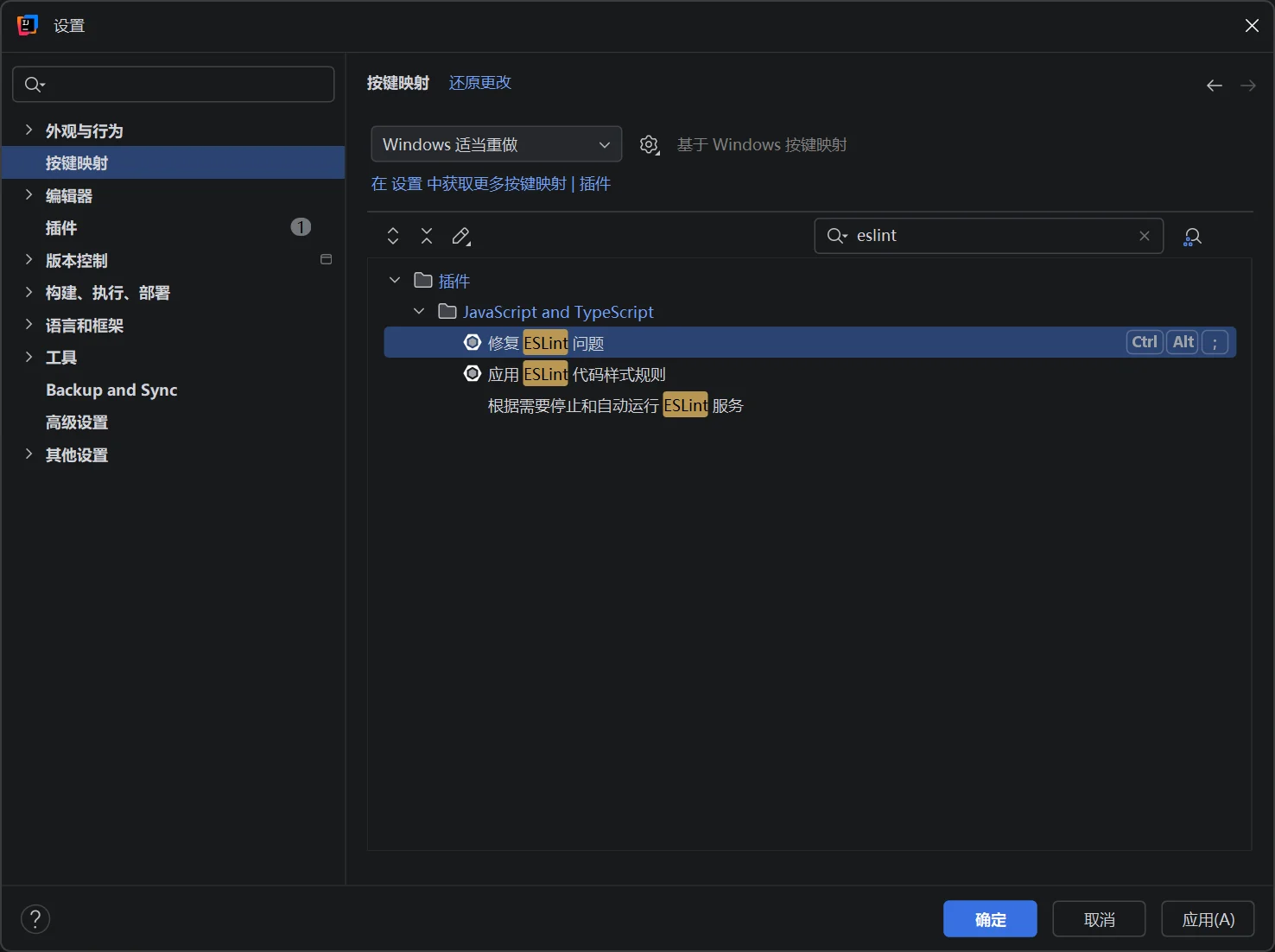
pnpm install使用快捷键 CTRL + ALT + S 打开设置
通过【按键映射】搜索【ESLint】双击【修复 ESLint 问题】
设置为 CTRL + ALT + ; 注意,首次修改会提示有被占用,移除即可
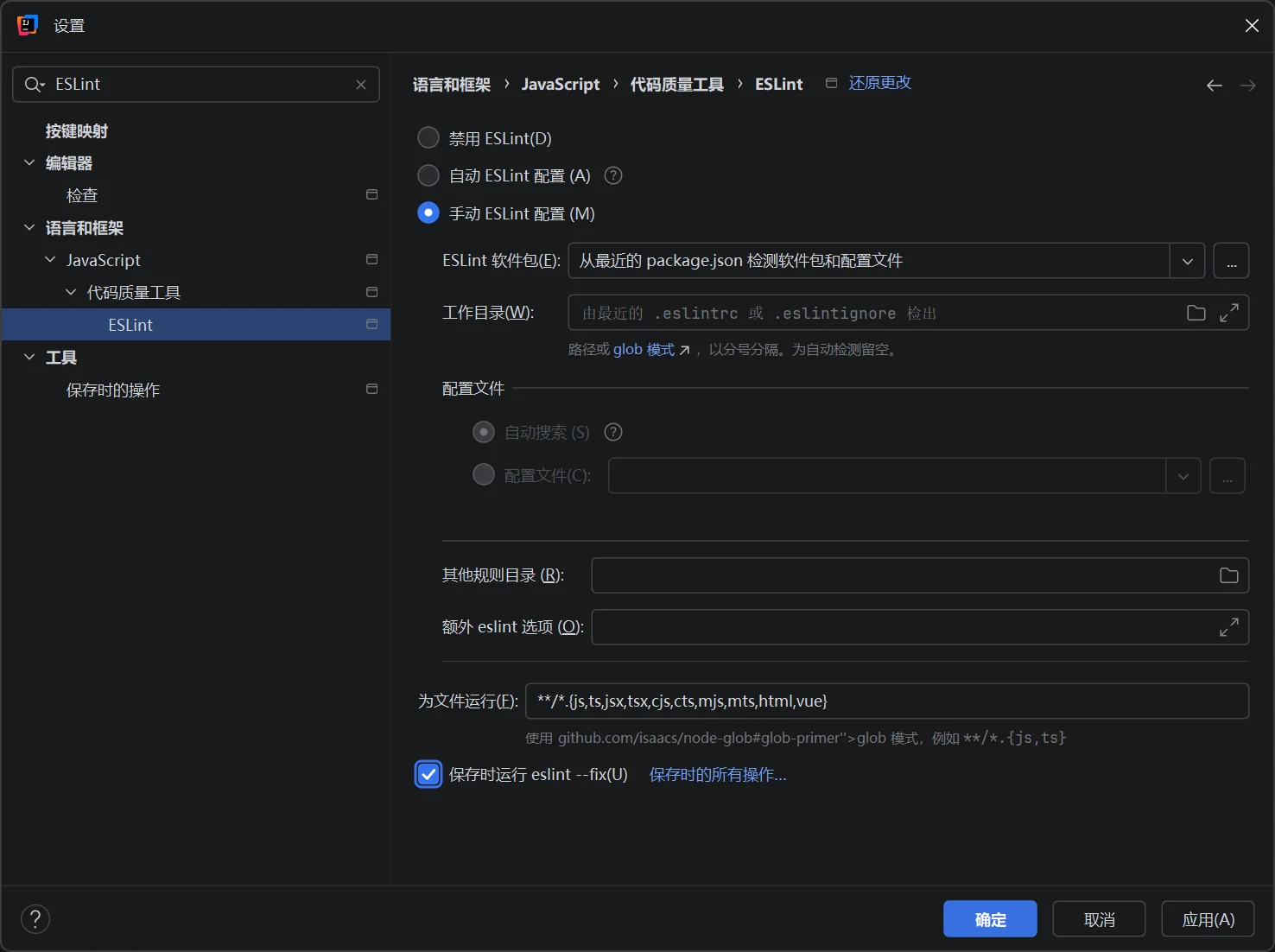
在设置中搜索 ESLint,按照下图进行配置
在设置中搜索 Prettier,按照下图进行配置
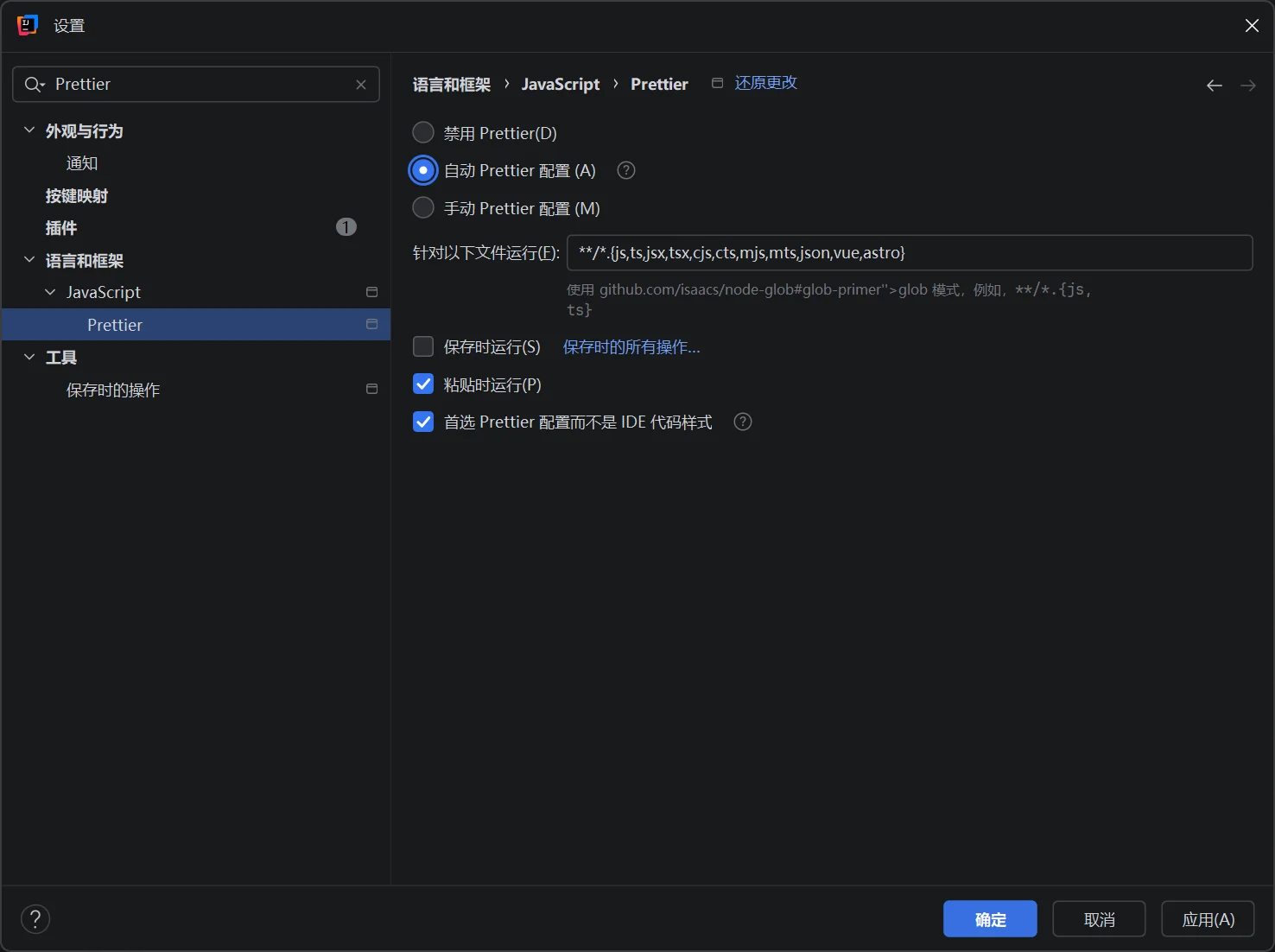
修改成功后,可以使用上述快捷通过 ESLint 修复代码中的问题并使用 Prettier 美化代码
注:仅按照上述配置是没有代码修复和美化功能的,由于模板帮我们配置过了,可以直接使用非常方便,纯手工建项目还需额外配置
