多环境配置是在软件开发中,为不同运行环境(如开发、测试、生产)提供不同配置的实践。在 Spring Boot 和 Maven 中,可以通过配置不同的配置文件和 Maven 的 profiles 来实现多环境配置。通过定义不同的属性、数据源、日志级别等,使得应用在不同环境下具有相应的行为和性能。例如,可以通过 application-dev.yml、application-prod.yml 等文件,结合 Maven profiles,实现对应环境的配置灵活切换。
在实际开发中,应用程序通常需要部署到不同的运行环境中,例如 开发环境、测试环境、生产环境 等。不同的环境可能需要不同的环境配置。为了适应这种情况,我们不可能手动变更配置文件来适应不同的开发环境。因此,需要对项目进行多环境配置。Spring Boot 框架提供了两种多环境配置的方式,分别是 Profile 文件多环境配置和 @Profile 注解多环境配置。
测试项目的 pom.xml 案例
<?xml version="1.0" encoding="UTF-8"?>
<project xmlns="http://maven.apache.org/POM/4.0.0" xmlns:xsi="http://www.w3.org/2001/XMLSchema-instance"
         xsi:schemaLocation="http://maven.apache.org/POM/4.0.0 https://maven.apache.org/xsd/maven-4.0.0.xsd">
    <modelVersion>4.0.0</modelVersion>

    <parent>
        <groupId>org.springframework.boot</groupId>
        <artifactId>spring-boot-starter-parent</artifactId>
        <version>3.5.14</version>
        <relativePath/> <!-- lookup parent from repository -->
    </parent>

    <groupId>com.lusifer</groupId>
    <artifactId>myprofile</artifactId>
    <version>0.0.1-SNAPSHOT</version>

    <name>myprofile</name>

    <properties>
        <java.version>17</java.version>
    </properties>

    <dependencies>
        <dependency>
            <groupId>org.springframework.boot</groupId>
            <artifactId>spring-boot-starter-web</artifactId>
        </dependency>

        <dependency>
            <groupId>com.baomidou</groupId>
            <artifactId>mybatis-plus-spring-boot3-starter</artifactId>
            <version>3.5.15</version>
        </dependency>
        <dependency>
            <groupId>com.mysql</groupId>
            <artifactId>mysql-connector-j</artifactId>
            <scope>runtime</scope>
        </dependency>

        <dependency>
            <groupId>org.projectlombok</groupId>
            <artifactId>lombok</artifactId>
            <optional>true</optional>
        </dependency>
        <dependency>
            <groupId>org.springframework.boot</groupId>
            <artifactId>spring-boot-starter-test</artifactId>
            <scope>test</scope>
        </dependency>
    </dependencies>

    <profiles>
        <profile>
            <id>local</id>
            <properties>
                <!-- 这里增加了 spring.active 属性 -->
                <spring.active>local</spring.active>
            </properties>
            <!-- 设置默认激活的配置 -->
            <activation>
                <activeByDefault>true</activeByDefault>
            </activation>
        </profile>
        <profile>
            <id>dev</id>
            <properties>
                <spring.active>dev</spring.active>
            </properties>
        </profile>
        <profile>
            <id>prod</id>
            <properties>
                <spring.active>prod</spring.active>
            </properties>
        </profile>
    </profiles>

    <build>
        <plugins>
            <plugin>
                <groupId>org.springframework.boot</groupId>
                <artifactId>spring-boot-maven-plugin</artifactId>
                <configuration>
                    <excludes>
                        <exclude>
                            <groupId>org.projectlombok</groupId>
                            <artifactId>lombok</artifactId>
                        </exclude>
                    </excludes>
                </configuration>
            </plugin>
            <plugin>
                <groupId>org.apache.maven.plugins</groupId>
                <artifactId>maven-compiler-plugin</artifactId>
                <executions>
                    <execution>
                        <id>default-compile</id>
                        <phase>compile</phase>
                        <goals>
                            <goal>compile</goal>
                        </goals>
                        <configuration>
                            <annotationProcessorPaths>
                                <path>
                                    <groupId>org.projectlombok</groupId>
                                    <artifactId>lombok</artifactId>
                                </path>
                            </annotationProcessorPaths>
                        </configuration>
                    </execution>
                    <execution>
                        <id>default-testCompile</id>
                        <phase>test-compile</phase>
                        <goals>
                            <goal>testCompile</goal>
                        </goals>
                        <configuration>
                            <annotationProcessorPaths>
                                <path>
                                    <groupId>org.projectlombok</groupId>
                                    <artifactId>lombok</artifactId>
                                </path>
                            </annotationProcessorPaths>
                        </configuration>
                    </execution>
                </executions>
            </plugin>
        </plugins>
    </build>
</project>在 pom.xml 中增加多环境配置,定义不同环境的专属属性。
<profiles>
    <profile>
        <id>local</id>
        <properties>
            <!-- 这里增加了 spring.active 属性 -->
            <spring.active>local</spring.active>
        </properties>
        <!-- 设置默认激活的配置 -->
        <activation>
            <activeByDefault>true</activeByDefault>
        </activation>
    </profile>
    <profile>
        <id>dev</id>
        <properties>
            <spring.active>dev</spring.active>
        </properties>
    </profile>
    <profile>
        <id>prod</id>
        <properties>
            <spring.active>prod</spring.active>
        </properties>
    </profile>
</profiles>配置文件命名格式:application-xxx.yml
通用配置:application.yml
本地环境:application-local.yml
开发环境:application-dev.yml
生产环境:application-prod.yml
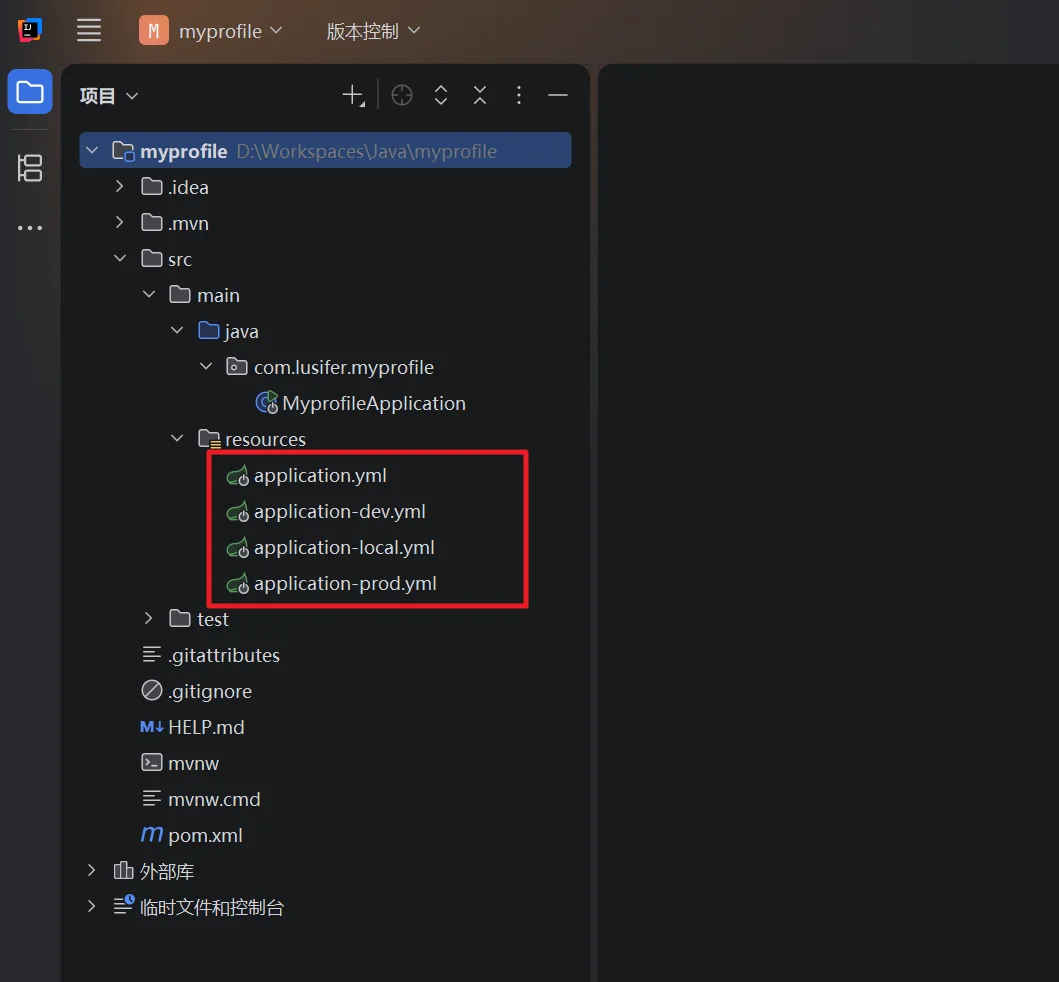
通用配置文件 application.yml,定义全局公共配置,通过 @spring.active@ 关联 Maven 环境配置。
server:
  port: 8080
  error:
    path: /error

spring:
  mvc:
    path-match:
      matching-strategy: ant_path_matcher
  application:
    name: myprofile
  profiles:
    active: @spring.active@

mybatis-plus:
  configuration:
    log-impl: org.apache.ibatis.logging.stdout.StdOutImpl
  mapper-locations: classpath*:/mapper/**/*.xml,classpath*:com/lusifer/**/mapping/*.xml

logging:
  level:
mybatis: INFO开发环境配置文件 application-dev.yml,自定义端口和数据源。
server:
  port: 8088

spring:
  datasource:
    driver-class-name: com.mysql.cj.jdbc.Driver
    url: jdbc:mysql://192.168.203.128:3306/crmeb?autoReconnect=true&useUnicode=true&characterEncoding=utf8&zeroDateTimeBehavior=CONVERT_TO_NULL&useSSL=false&serverTimezone=Asia/Shanghai&nullCatalogMeansCurrent=true
    username: root
    password: 123456
    type: com.zaxxer.hikari.HikariDataSource
    hikari:
      maximum-pool-size: 20
connection-timeout: 30000本地环境配置文件 application-local.yml,适配本地测试的数据源。
spring:
  datasource:
    driver-class-name: com.mysql.cj.jdbc.Driver
    url: jdbc:mysql://192.168.203.128:3306/crmeb?autoReconnect=true&useUnicode=true&characterEncoding=utf8&zeroDateTimeBehavior=CONVERT_TO_NULL&useSSL=false&serverTimezone=Asia/Shanghai&nullCatalogMeansCurrent=true
    username: root
    password: 123456
    type: com.zaxxer.hikari.HikariDataSource
    hikari:
      maximum-pool-size: 20
connection-timeout: 30000生产环境配置文件 application-prod.yml,关闭调试功能,使用环境变量注入敏感配置,适配线上部署。
spring:
  datasource:
    driver-class-name: com.mysql.cj.jdbc.Driver
    url: jdbc:mysql://${DEVOPS_MYSQL_HOST}:${DEVOPS_MYSQL_PORT}/${DEVOPS_MYSQL_DATABASE_NAME}?autoReconnect=true&useUnicode=true&characterEncoding=utf8&zeroDateTimeBehavior=CONVERT_TO_NULL&useSSL=false&serverTimezone=Asia/Shanghai&nullCatalogMeansCurrent=true
    username: ${DEVOPS_MYSQL_USERNAME}
    password: ${DEVOPS_MYSQL_PASSWORD}
    type: com.zaxxer.hikari.HikariDataSource
    hikari:
      maximum-pool-size: 100
connection-timeout: 30000使用 -P 参数指定 Maven 环境 ID,打包对应配置的项目包。
# -P 参数后面为 profile 对应的 id
mvn clean package -Pprod通过 JVM 参数指定环境,无需重新打包,灵活切换配置。
java -jar ./xxx.jar --spring.profiles.active=prod编辑应用启动配置,增加虚拟机选项,实现本地开发时快速切换环境。
-Dspring.profiles.active=dev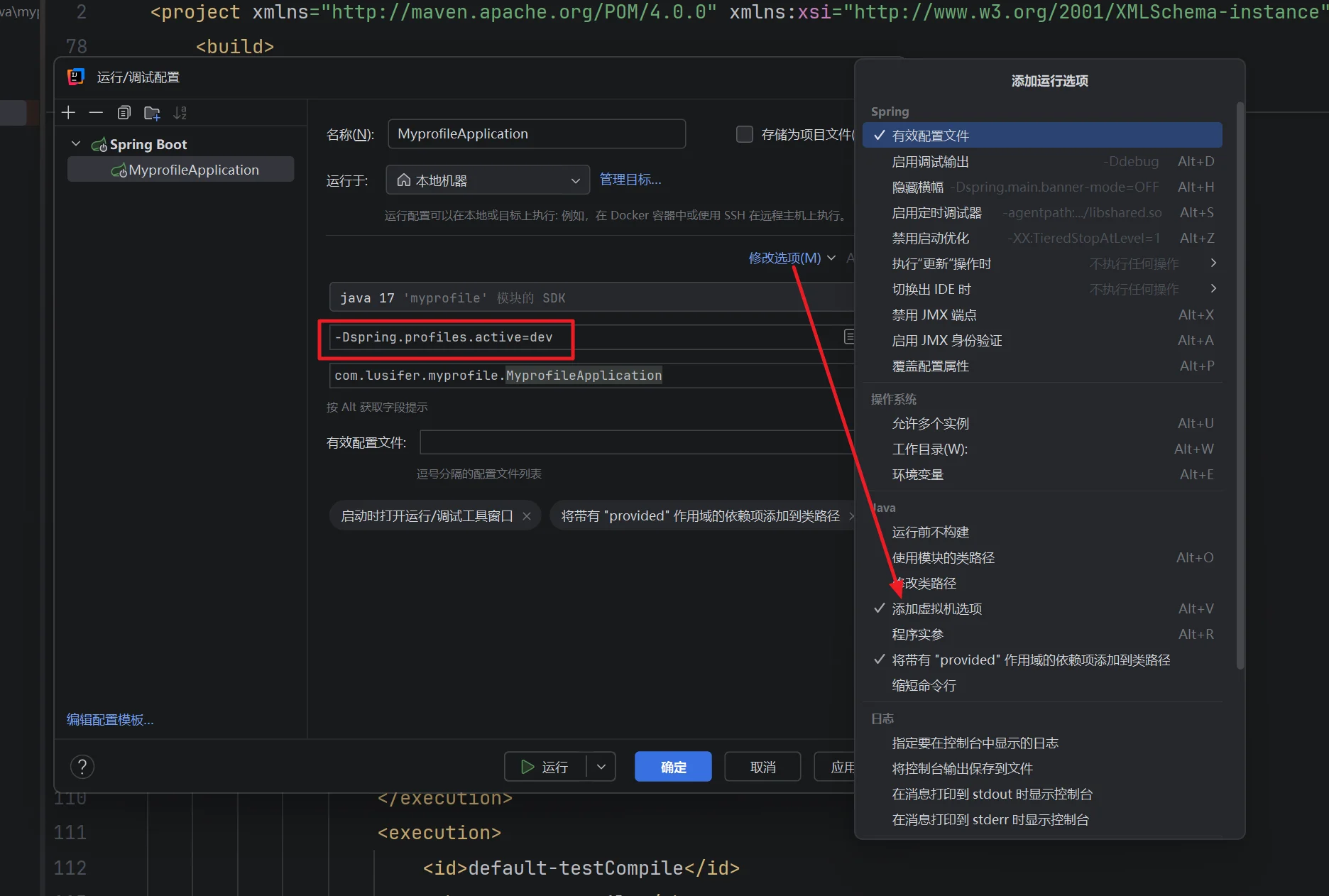
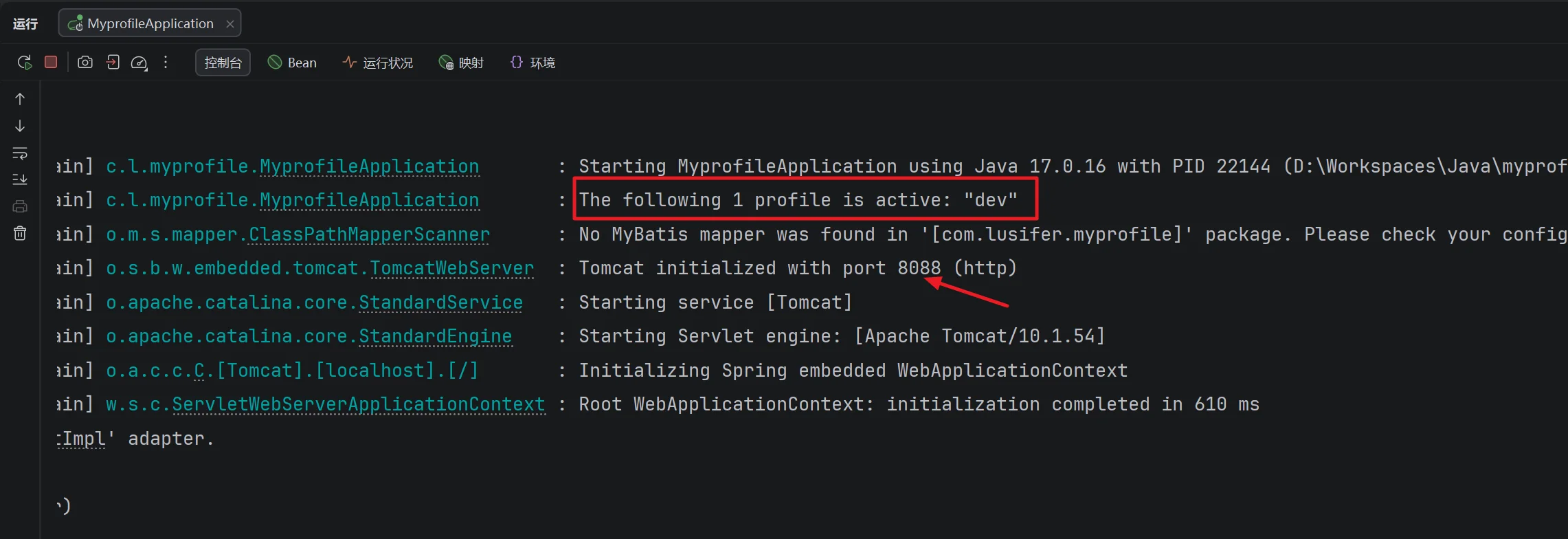
启动项目观察控制台日志,可以看到已成功切换到对应的运行环境。