掌握 Tailwind CSS 中字体家族、大小、字重及颜色的核心类名,构建清晰的视觉层级。
熟练运用行高(Line Height)、字间距(Letter Spacing)和文本对齐属性,优化阅读体验。
学会使用 truncate、break-words 等高级文本处理类名,解决内容溢出和换行难题。
理解文本转换(Transform)和空白符(Whitespace)控制的应用场景,适应不同设计需求。
能够组合多种排版属性,快速还原设计稿中的标题、正文、标签及代码块样式。
字体是排版的骨架。Tailwind CSS 提供了语义化的类名来控制字体的基本外观。
Font Family
font-sans: 无衬线字体(默认),适用于正文和现代 UI 界面(如 Inter, system-ui)。
font-serif: 衬线字体,适用于传统、优雅的场景或长篇文章(如 Georgia, Times New Roman)。
font-mono: 等宽字体,专为代码块、终端显示或数字对齐设计(如 Fira Code, Consolas)。
Font Size
Tailwind 提供了一套从极小到极大的阶梯式字号,基于 rem 单位,确保响应式缩放。
text-xs (0.75rem / 12px): 辅助信息、标签。
text-sm (0.875rem / 14px): 次要文本、按钮文字。
text-base (1rem / 16px): 标准正文大小。
text-lg (1.125rem / 18px) 到 text-xl: 小标题。
text-2xl 到 text-9xl: progressively larger headings for hero sections and display text.
提示:可以配合响应式前缀使用,如 text-base md:text-lg。
Font Weight
控制字体的粗细程度,从极细到极粗。
font-thin (100) 到 font-extralight (200): 极少用,需字体文件支持。
font-light (300): 纤细风格。
font-normal (400): 标准正文。
font-medium (500): 稍加粗,常用于强调。
font-semibold (600): 半粗体,常用的小标题字重。
font-bold (700): 标准粗体。
font-extrabold (800) 到 font-black (900): 极具冲击力的展示型标题。
博客文章头部排版
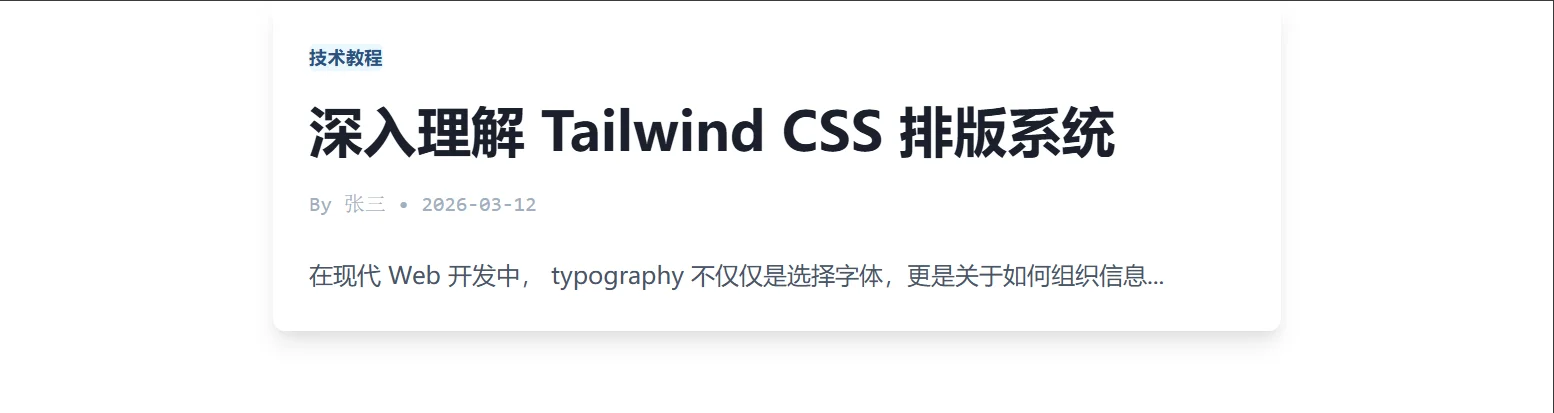
<!DOCTYPE html>
<html lang="zh-CN">
<head>
<meta charset="UTF-8">
<title>Tailwind Auto Cols 对比演示</title>
<script src="https://cdn.tailwindcss.com"></script>
</head>
<body>
<article class="max-w-2xl mx-auto p-6 bg-white shadow-lg rounded-lg">
<!-- 分类标签:小字号、中等字重、大写 -->
<span
class="inline-block bg-blue-100 text-blue-800 text-xs font-semibold px-2.5 py-0.5 rounded uppercase tracking-wide">
技术教程
</span>
<!-- 主标题:大字号、极粗字重、紧凑行高 -->
<h1 class="mt-4 text-4xl font-extrabold text-gray-900 leading-tight">
深入理解 Tailwind CSS 排版系统
</h1>
<!-- 作者信息:小字号、灰色、等宽字体显示时间 -->
<div class="mt-4 flex items-center space-x-2 text-sm text-gray-500 font-mono">
<span>By 张三</span>
<span>•</span>
<span>2026-03-12</span>
</div>
<!-- 正文摘要:标准字号、正常行高 -->
<p class="mt-6 text-base text-gray-700 leading-relaxed">
在现代 Web 开发中, typography 不仅仅是选择字体,更是关于如何组织信息...
</p>
</article>
</body>
</html>文本的视觉表现力很大程度上取决于颜色和对齐方式。
Text Color
Tailwind 的颜色系统非常强大,支持 text-{color}-{shade} 格式。
基础色: text-black, text-white.
灰色阶: text-gray-50 (极浅) 到 text-gray-900 (极深)。常用 text-gray-600 做次要文本。
主题色: text-red-500, text-blue-600, text-green-400 等,用于链接、状态提示或强调。
Text Alignment
text-left: 左对齐(默认,适合 LTR 语言)。
text-center: 居中对齐,常用于标题、英雄区文案。
text-right: 右对齐,适合 RTL 语言或特定布局。
text-justify: 两端对齐,使文本块边缘整齐(中文排版慎用,可能导致字间距过大)。
Decoration & Transform
装饰: underline (下划线), no-underline (移除下划线,常用于链接重置), line-through (删除线,用于价格折扣)。
转换:
uppercase: 全部大写。
lowercase: 全部小写。
capitalize: 首字母大写。
价格卡片与链接样式

<!DOCTYPE html>
<html lang="zh-CN">

<head>
    <meta charset="UTF-8">
    <title>Tailwind Auto Cols 对比演示</title>
    <script src="https://cdn.tailwindcss.com"></script>
</head>

<body>
    <div class="grid grid-cols-1 md:grid-cols-2 gap-8 p-8">

        <!-- 价格卡片 -->
        <div class="border rounded-lg p-6 text-center hover:shadow-lg transition">
            <h3 class="text-lg font-medium text-gray-900">专业版</h3>
            <!-- 原价:删除线、灰色 -->
            <p class="mt-2 text-sm text-gray-400 line-through">¥199/月</p>
            <!-- 现价:大字号、粗体、主题色 -->
            <p class="text-4xl font-bold text-blue-600">¥99<span class="text-base font-normal text-gray-500">/月</span>
            </p>

            <!-- 特性列表:左对齐、常规 -->
            <ul class="mt-6 text-left space-y-3 text-sm text-gray-600">
                <li class="flex items-center"><span class="text-green-500 mr-2">✓</span> 无限项目</li>
                <li class="flex items-center"><span class="text-green-500 mr-2">✓</span> 优先支持</li>
                <li class="flex items-center"><span class="text-red-500 mr-2">✕</span> 自定义域名</li>
            </ul>

            <!-- 按钮:全大写、加粗、无下划线 -->
            <button
                class="mt-8 w-full bg-blue-600 text-white font-bold py-3 px-4 rounded uppercase hover:bg-blue-700 no-underline">
                立即订阅
            </button>
        </div>

        <!-- 链接与强调 -->
        <div class="space-y-4">
            <p class="text-base text-gray-700">
                请访问我们的 <a href="#" class="text-blue-600 underline hover:text-blue-800">官方文档</a> 获取更多信息。
                或者查看 <a href="#" class="text-indigo-600 font-medium no-underline hover:underline">最新更新日志</a>。
            </p>

            <div class="bg-yellow-50 border-l-4 border-yellow-400 p-4">
                <p class="text-sm text-yellow-700 capitalize">
                    注意:此功能仅在 beta 版本中可用。
                </p>
            </div>
        </div>

    </div>
</body>

</html>精细的排版调整能显著提升界面的精致度。
Line Height
控制行与行之间的垂直距离。
leading-none (1): 极度紧凑,仅用于超大图标或特殊设计。
leading-tight (1.25): 适合大标题。
leading-snug (1.375): 稍紧凑。
leading-normal (1.5): 标准正文行高。
leading-relaxed (1.625): 宽松,适合长文阅读。
leading-loose (2): 极度宽松,少见。
Letter Spacing / Tracking
控制字符之间的水平距离。
tracking-tighter: 紧缩,适合超大标题。
tracking-tight: 稍紧。
tracking-normal: 默认。
tracking-wide: 加宽,适合大写字母标题或标签。
tracking-widest: 极宽,用于装饰性文本。
Whitespace & Word Break
控制文本如何处理空格、换行和溢出。
whitespace-nowrap: 强制文本不换行,在一行显示(常配合 overflow-hidden 使用)。
whitespace-pre: 保留源码中的空格和换行(类似 <pre> 标签)。
break-words: 允许在长单词内部换行,防止溢出容器。
break-all: 激进换行,即使破坏单词结构也在所不惜(较少用)。
truncate: 神器类名。当文本溢出时显示省略号 (...)。需配合固定宽度或 max-w 使用,隐含了 overflow-hidden, text-overflow: ellipsis, white-space: nowrap。
复杂文本处理场景
<!DOCTYPE html>
<html lang="zh-CN">

<head>
    <meta charset="UTF-8">
    <title>Tailwind Auto Cols 对比演示</title>
    <script src="https://cdn.tailwindcss.com"></script>
</head>

<body>
    <div class="p-8 space-y-8 bg-gray-50">

        <!-- 场景 1: 标题的字间距优化 -->
        <div class="bg-white p-6 rounded shadow">
            <h2 class="text-3xl font-bold text-gray-900 tracking-tight">
                紧凑的大标题
            </h2>
            <h3 class="mt-4 text-sm font-semibold text-gray-500 uppercase tracking-widest">
                副标题 / 章节头
            </h3>
        </div>

        <!-- 场景 2: 长文本截断 (Truncate) -->
        <div class="bg-white p-6 rounded shadow max-w-md">
            <h4 class="font-bold mb-2">文件列表</h4>
            <ul class="space-y-2">
                <li class="text-sm text-gray-700 truncate" title="这是一个非常长的文件名,用于测试 truncate 效果.pdf">
                    这是一个非常长的文件名,用于测试 truncate 效果.pdf
                </li>
                <li class="text-sm text-gray-700 truncate" title="2026年第一季度财务报告最终版_修订版_v3.xlsx">
                    2026年第一季度财务报告最终版_修订版_v3.xlsx
                </li>
                <li class="text-sm text-gray-700">
                    短文件名.txt (不需要截断)
                </li>
            </ul>
            <p class="text-xs text-gray-400 mt-2">* 鼠标悬停查看完整文件名 (通过 title 属性)</p>
        </div>

        <!-- 场景 3: 强制不换行与自动换行 -->
        <div class="bg-white p-6 rounded shadow grid grid-cols-2 gap-4">
            <div class="border p-2">
                <p class="text-sm font-bold mb-1">whitespace-nowrap:</p>
                <div class="w-32 border bg-gray-100 whitespace-nowrap overflow-hidden text-ellipsis">
                    这是一段很长很长绝对不会换行的文字
                </div>
            </div>
            <div class="border p-2">
                <p class="text-sm font-bold mb-1">break-words:</p>
                <div class="w-32 border bg-gray-100 break-words">
                    SuperLongVariableNameThatShouldBreak
                </div>
            </div>
        </div>

        <!-- 场景 4: 代码块样式 -->
        <div class="bg-gray-900 text-gray-100 p-4 rounded font-mono text-sm whitespace-pre overflow-x-auto">
            <code>function hello() {
  console.log("Hello World");
  // 这里的缩进会被保留
}</code>
        </div>

    </div>
</body>

</html>