理解 Writer 类在 Java I/O 体系中的作用与定位
掌握 Writer 的核心方法及其使用方式
能够通过子类(如 FileWriter、BufferedWriter)向文件写入文本
学会以追加模式写入数据
掌握资源管理与性能优化的最佳实践
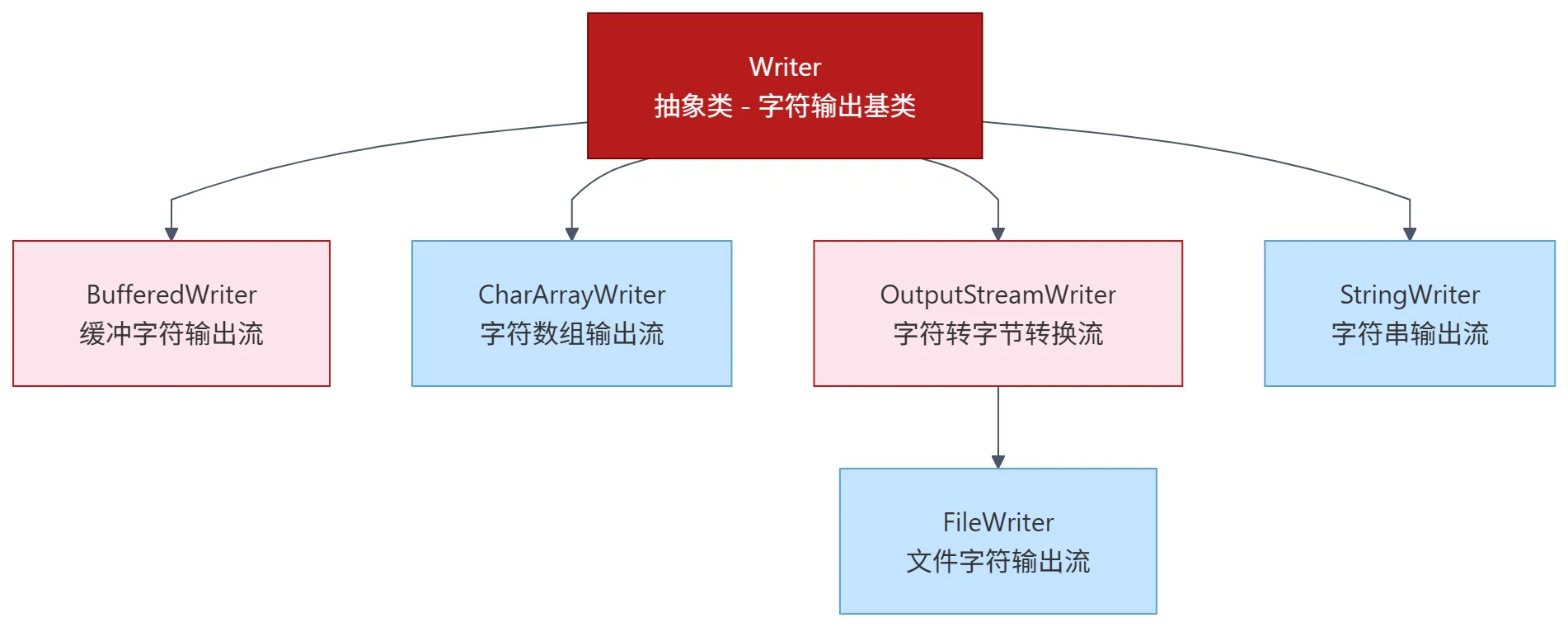
Writer 是 Java 中用于写入字符流的抽象基类,位于 java.io 包中。它专为处理 16 位 Unicode 字符而设计,适用于所有文本数据的输出操作。与字节输出流(OutputStream)不同,Writer 及其子类能自动处理字符编码,是向文件、控制台或其他目的地写入文本的首选方式。
类声明
public abstract class Writer implements Appendable, Closeable, Flushable实现 Appendable:支持 append() 方法(可用于 StringBuilder 链式调用)
实现 Closeable:提供 close() 方法释放资源
实现 Flushable:提供 flush() 方法强制写出缓冲区内容
Writer是抽象类,不能直接实例化,必须使用其具体子类。
使用 FileWriter 写入文件
以下程序演示如何将字符串写入文件:
import java.io.FileWriter;
import java.io.IOException;

public class FileWriterExample {
    public static void main(String[] args) {
        try (FileWriter writer = new FileWriter("example.txt")) {
            writer.write("Hello, World!");
            // try-with-resources 自动调用 close()
            System.out.println("消息已写入文件");
        } catch (IOException e) {
            System.err.println("写入文件时发生错误: " + e.getMessage());
        }
    }
}
结果:
当前目录下生成 example.txt,内容为:
Hello, World!使用 try-with-resources 确保流被正确关闭,避免数据丢失或资源泄漏
频繁的小量写入会导致大量磁盘 I/O。BufferedWriter 通过内部缓冲区减少实际写入次数,显著提升性能。
import java.io.*;

public class BufferedWriterExample {
    public static void main(String[] args) {
        try (Writer writer = new BufferedWriter(new FileWriter("buffered.txt"))) {
            writer.write("BufferedWriter 使写入更高效。");
            writer.write("\n它通过缓冲机制减少磁盘 I/O 次数。");
            System.out.println("数据已通过 BufferedWriter 写入");
        } catch (IOException e) {
            e.printStackTrace();
        }
    }
}
输出文件内容:
BufferedWriter 使写入更高效。
它通过缓冲机制减少磁盘 I/O 次数。
默认缓冲区大小通常为 8KB,可通过构造函数自定义
默认情况下,FileWriter 会覆盖原文件内容。若需追加内容,需在构造函数中传入 true:
import java.io.*;

public class AppendModeExample {
    public static void main(String[] args) {
        try (Writer writer = new FileWriter("example.txt", true)) {
            writer.write("\n此行是后续追加的内容。");
            System.out.println("数据已成功追加");
        } catch (IOException e) {
            e.printStackTrace();
        }
    }
}
假设原文件内容为:
Hello, World!追加后变为:
Hello, World!
此行是后续追加的内容。
注意:
\n在不同操作系统换行符不同。为跨平台兼容,建议使用System.lineSeparator()或BufferedWriter.newLine()
Writer 提供两个受保护的构造器,主要用于子类实现同步控制:
protected Writer()
// 同步锁为 this

protected Writer(Object lock)
// 使用指定对象作为同步锁
普通开发者通常不直接使用这些构造器。
优先使用字符流写入文本:避免手动处理编码问题
始终使用 try-with-resources:确保 close() 被调用,防止资源泄漏
大量写入时使用 BufferedWriter:显著提升 I/O 性能
指定编码更安全:FileWriter 使用系统默认编码,跨平台可能出错。推荐:
Writer writer = new OutputStreamWriter(
    new FileOutputStream("output.txt"),
    StandardCharsets.UTF_8
);
换行使用 newLine()(BufferedWriter):
BufferedWriter bw = new BufferedWriter(new FileWriter("log.txt"));
bw.write("第一行");
bw.newLine(); // 跨平台安全换行
bw.write("第二行");Writer 是所有字符输出流的抽象基类,用于写入文本数据
常用子类包括 FileWriter、BufferedWriter、PrintWriter
支持写入字符、字符数组、字符串及其子序列
flush() 强制写出缓冲区,close() 自动 flush 并释放资源
追加模式通过 new FileWriter(file, true) 启用
性能敏感场景务必使用 BufferedWriter
为什么直接使用 FileWriter 频繁写入小段文本效率低下?BufferedWriter 是如何解决这个问题的?
write(String) 和 append(CharSequence) 在功能上有何异同?在什么场景下应优先使用 append()?
如果不调用 close() 或 flush(),在什么情况下可能导致数据未写入文件?如何验证?
