使用 HTML、CSS 和 JavaScript 实现一个具有展开 / 收起动画效果的搜索框组件。初始状态下只显示搜索图标,点击后平滑展开为完整的搜索输入框,并显示关闭按钮。
本题要求实现一个现代化的搜索框交互组件,具备以下功能:
页面加载后仅显示一个圆形搜索图标(使用 Ionicons 图标库)
点击搜索图标时,搜索框向右平滑展开,显示输入框和占位符文本
展开状态下右侧显示关闭图标,点击可收起搜索框
关闭按钮具有延迟出现的动画效果,增强用户体验
该实现结合了:
HTML 结构搭建(包含 Ionicons 图标引用)
CSS 样式设计(包括定位、过渡动画、弹性布局)
JavaScript 事件处理(点击事件控制类切换)
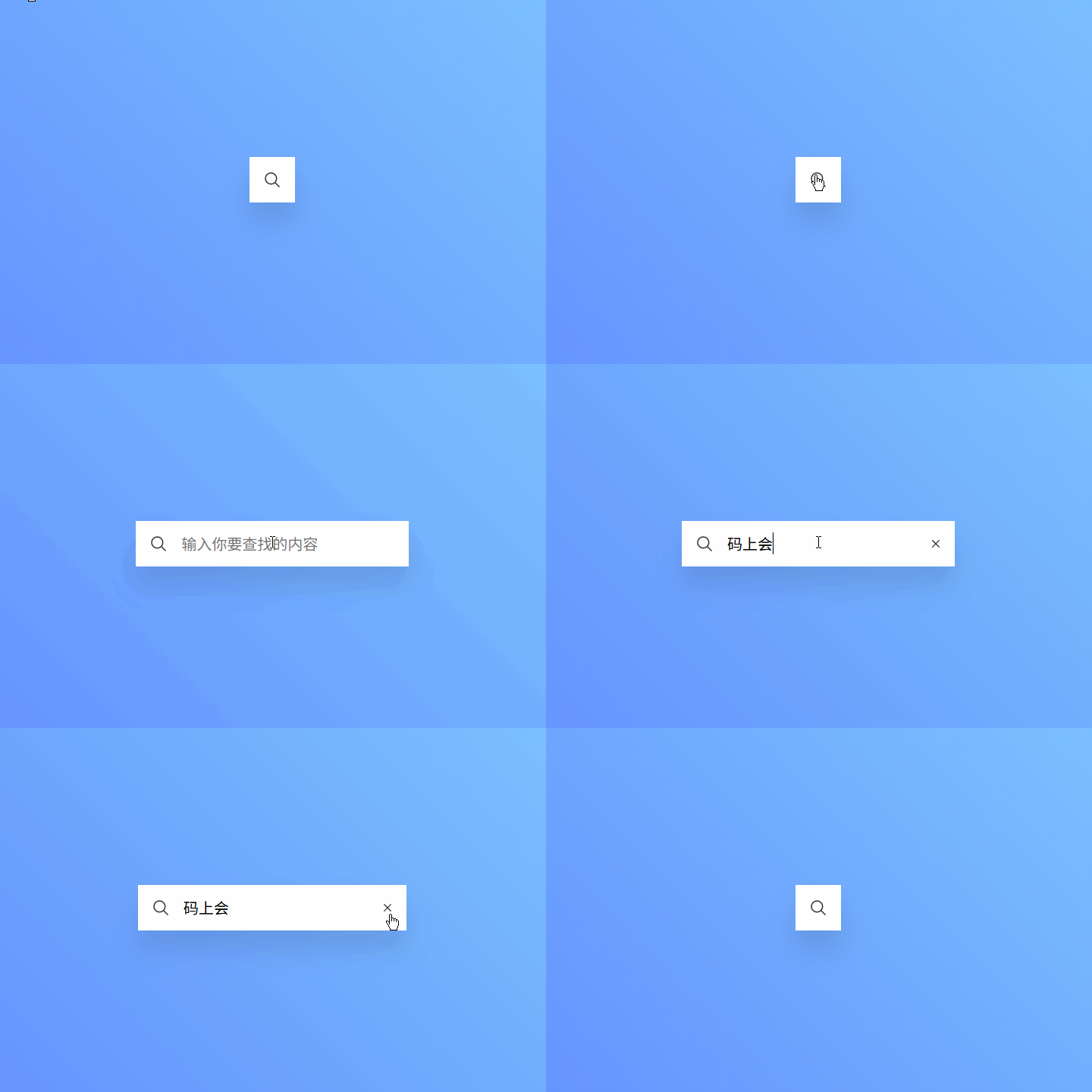
页面初始状态:显示一个白色圆形背景的搜索图标,位于页面中央
点击搜索图标:搜索框向右平滑扩展至 360px 宽度,同时显示 "输入你要查找的内容" 的输入框
展开完成后:右侧淡入显示关闭图标(有 0.5 秒延迟)
点击关闭图标:搜索框恢复到初始状态,仅显示搜索图标
结构设计:
使用 .searchBox 作为容器,包含搜索图标、输入框和关闭图标三个部分
初始宽度设为 60px(仅容纳搜索图标),展开后变为 360px
输入框和关闭图标使用绝对定位精确控制位置
动画实现:
宽度变化通过 transition: 0.5s 实现平滑扩展
关闭按钮使用 scale: 0 初始隐藏,激活时 scale: 1 显示
关闭按钮设置 transition-delay: 0.5s 实现延迟出现效果
交互逻辑:
点击搜索区域添加 active 类触发展开
点击关闭区域移除 active 类触发收起
使用 Ionicons 提供的 search-outline 和 close-outline 图标
<!DOCTYPE html>
<html lang="zh-CN">
<head>
  <meta charset="UTF-8">
  <title>搜索框的动画效果</title>
  <style>
    * {
      margin: 0;
      padding: 0;
      box-sizing: border-box;
      font-family: 'Ubuntu', sans-serif;
    }
    body {
      display: flex;
      justify-content: center;
      align-items: center;
      min-height: 100vh;
      background: #6aa7d4;
      background: linear-gradient(45deg,#4E65FF ,#92EFFD);
    }
    .searchBox {
      position: relative;
      width: 60px;
      height: 60px;
      background: #fff;
      display: flex;
      justify-content: space-between;
      transition: 0.5s;
      overflow: hidden;
      box-shadow: 0 25px 35px rgba(0,0,0,0.1);
    }
    .searchBox.active {
      width: 360px;
    }
    .search {
      position: relative;
      width: 60px;
      height: 60px;
      display: flex;
      color: #333;
      justify-content: center;
      align-items: center;
      font-size: 1.5em;
      cursor: pointer;
    }
    .close {
      position: absolute;
      right: 0;
      width: 50px;
      height: 60px;
      display: flex;
      color: #333;
      justify-content: center;
      align-items: center;
      scale: 0;
      cursor: pointer;
      font-size: 1.25em;
      transition: 0.5s;
      transition-delay: 0s;
    }
    .searchBox.active .close {
      scale: 1;
      transition-delay: 0.5s;
    }
    .searchInput {
      position: absolute;
      left: 60px;
      width: calc(100% - 120px);
      height: 100%;
      line-height: 60px;
      background: #f00;
    }
    .searchInput input {
      position: absolute;
      width: 100%;
      height: 100%;
      border: none;
      outline: none;
      font-size: 1.25em;
    }
  </style>
</head>
<body>
  <div class="searchBox">
    <div class="search">
      <ion-icon name="search-outline"></ion-icon>
    </div>
    <div class="searchInput">
      <input type="text" placeholder="输入你要查找的内容">
    </div>
    <div class="close">
      <ion-icon name="close-outline"></ion-icon>
    </div>
  </div>

  <!--字体图标文件-->
  <script type="module" src="https://unpkg.com/ionicons@5.5.2/dist/ionicons/ionicons.esm.js"></script>
  <script nomodule src="https://unpkg.com/ionicons@5.5.2/dist/ionicons/ionicons.js"></script>

  <script>
    const search = document.querySelector('.search');
    const close = document.querySelector('.close');
    const searchBox = document.querySelector('.searchBox');
    search.onclick = function(){
      searchBox.classList.add('active');
    }
    close.onclick = function(){
      searchBox.classList.remove('active');
    }
  </script>
</body>
</html>这是一个典型的现代 Web UI 组件实现案例,展示了如何创建具有流畅动画效果的交互元素。值得注意的是:
视觉设计:
使用渐变背景(#4E65FF 到 #92EFFD)营造清新科技感
白色搜索框配合阴影效果(box-shadow)增强立体感
字体使用 Ubuntu 字体族,简洁现代
技术细节:
利用 overflow: hidden 隐藏超出容器的内容
输入框宽度使用 calc(100% - 120px) 精确计算(60px 搜索区 + 60px 关闭区)
关闭按钮的延迟动画提升了用户体验的精致度
