掌握字符集拼接与随机索引选择的密码生成逻辑
实现基于用户偏好的动态字符池构建(大小写、数字、特殊符号)
理解密码安全性与字符多样性的关系
构建一个具备良好用户体验的交互式前端工具
学会使用现代 CSS 技术(如 Flexbox、透明背景、渐变)美化界面
一个强密码应具备以下特征:
本项目默认启用所有选项,符合 NIST(美国国家标准与技术研究院)对强密码的建议。
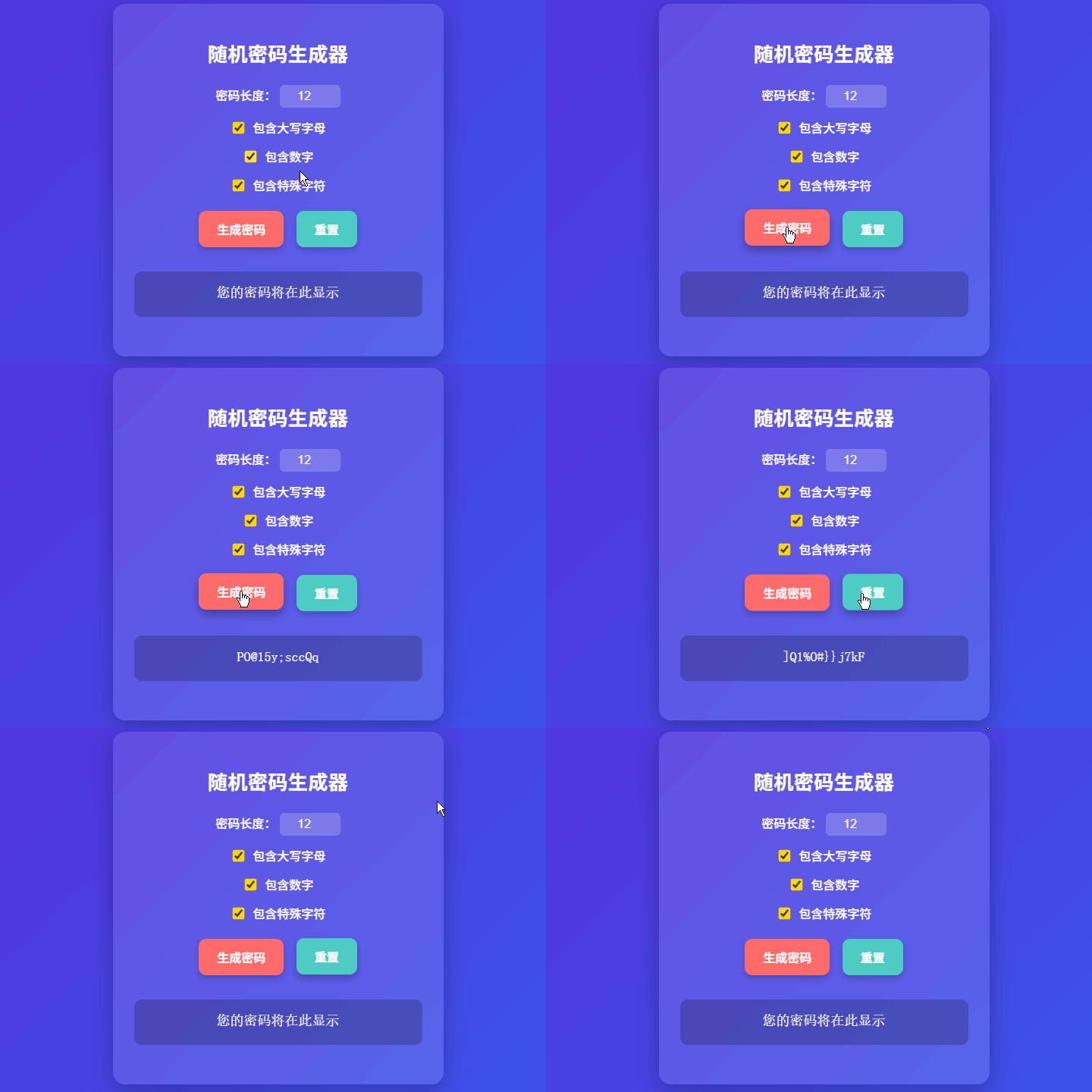
我们将实现一个可定制化密码生成器,支持:
设置密码长度(默认 12,最小 6)
勾选是否包含:
大写字母(A–Z)
数字(0–9)
特殊字符(如 !@#$%^&*)
一键生成符合要求的随机密码
“重置”按钮恢复默认配置
结果区域自动换行,便于复制
<div class="container">
  <h1>密码生成器</h1>

  <label>
    密码长度:
    <input id="len" type="number" min="6" max="128" value="12" />
  </label>

  <label>
    <input id="upper" type="checkbox" checked /> 包含大写字母
  </label>

  <label>
    <input id="nums" type="checkbox" checked /> 包含数字
  </label>

  <label>
    <input id="special" type="checkbox" checked /> 包含特殊字符
  </label>

  <button class="btn" id="generateBtn">生成密码</button>
  <button class="btn" id="resetBtn">重置</button>

  <div class="output" id="passOut">您的密码将在此显示</div>
</div>
设计说明:
使用 <label> 包裹 <input>:提升点击区域,改善移动端体验
限制 max="128":防止生成过长密码导致性能问题
默认全选:鼓励用户生成高强度密码
body {
  font-family: -apple-system, BlinkMacSystemFont, "Segoe UI", sans-serif;
  background: linear-gradient(135deg, #6a11cb 0%, #2575fc 100%);
  color: white;
  display: flex;
  justify-content: center;
  align-items: center;
  min-height: 100vh;
  margin: 0;
  padding: 20px;
}

.container {
  background: rgba(255, 255, 255, 0.12);
  backdrop-filter: blur(10px); /* 毛玻璃效果(现代浏览器支持) */
  padding: 28px;
  border-radius: 16px;
  box-shadow: 0 10px 30px rgba(0, 0, 0, 0.25);
  text-align: center;
  width: 100%;
  max-width: 380px;
}

h1 {
  font-size: 26px;
  font-weight: 700;
  margin-bottom: 24px;
  letter-spacing: 0.5px;
}

label {
  display: block;
  margin: 14px 0;
  font-size: 16px;
  font-weight: 500;
}

input[type="number"] {
  width: 60px;
  padding: 6px 10px;
  border: none;
  border-radius: 6px;
  background: rgba(255, 255, 255, 0.2);
  color: white;
  text-align: center;
  font-size: 16px;
}

input[type="checkbox"] {
  transform: scale(1.2);
  margin-right: 8px;
  accent-color: #ffd700; /* 自定义复选框颜色 */
}

.output {
  margin: 24px 0;
  padding: 16px;
  font-size: 18px;
  font-family: monospace;
  background: rgba(0, 0, 0, 0.2);
  border-radius: 10px;
  word-break: break-all;
  min-height: 28px;
  line-height: 1.4;
}

.btn {
  background: #ff6b6b;
  color: white;
  border: none;
  padding: 12px 24px;
  margin: 8px 6px;
  border-radius: 10px;
  font-size: 16px;
  font-weight: 600;
  cursor: pointer;
  transition: all 0.25s ease;
  box-shadow: 0 4px 8px rgba(0, 0, 0, 0.2);
}

.btn:hover {
  transform: translateY(-2px);
  box-shadow: 0 6px 12px rgba(0, 0, 0, 0.3);
}

#resetBtn {
  background: #4ecdc4;
}
视觉亮点:
毛玻璃效果(backdrop-filter: blur()):提升现代感
自定义复选框颜色:更符合主题色
等宽字体显示密码:便于区分 0/O、1/l 等易混淆字符
悬停动效:增强交互反馈
// 字符集定义
const LOWERCASE = "abcdefghijklmnopqrstuvwxyz";
const UPPERCASE = "ABCDEFGHIJKLMNOPQRSTUVWXYZ";
const NUMBERS = "0123456789";
const SPECIAL = "!@#$%^&*()-_=+[]{}|;:,.<>?";

// 生成密码函数
function generatePassword(length, includeUpper, includeNumbers, includeSpecial) {
  if (length < 1) return "";

  let charPool = LOWERCASE;

  if (includeUpper) charPool += UPPERCASE;
  if (includeNumbers) charPool += NUMBERS;
  if (includeSpecial) charPool += SPECIAL;

  // 安全检查:确保字符池非空
  if (charPool.length === 0) {
    alert("请至少选择一种字符类型!");
    return "";
  }

  let password = "";
  for (let i = 0; i < length; i++) {
    const randomIndex = Math.floor(Math.random() * charPool.length);
    password += charPool[randomIndex];
  }

  return password;
}

// DOM 元素获取
const lenInput = document.getElementById('len');
const upperCheckbox = document.getElementById('upper');
const numsCheckbox = document.getElementById('nums');
const specialCheckbox = document.getElementById('special');
const generateBtn = document.getElementById('generateBtn');
const resetBtn = document.getElementById('resetBtn');
const outputDiv = document.getElementById('passOut');

// 生成密码并显示
function handleGenerate() {
  const length = parseInt(lenInput.value, 10);

  if (isNaN(length) || length < 6) {
    outputDiv.textContent = "长度至少为 6 位";
    return;
  }

  const password = generatePassword(
    length,
    upperCheckbox.checked,
    numsCheckbox.checked,
    specialCheckbox.checked
  );

  if (password) {
    outputDiv.textContent = password;
  }
}

// 重置表单
function handleReset() {
  lenInput.value = 12;
  upperCheckbox.checked = true;
  numsCheckbox.checked = true;
  specialCheckbox.checked = true;
  outputDiv.textContent = "您的密码将在此显示";
}

// 绑定事件(避免内联 onclick)
generateBtn.addEventListener('click', handleGenerate);
resetBtn.addEventListener('click', handleReset);

// 支持回车键快速生成
document.addEventListener('keypress', (e) => {
  if (e.key === 'Enter') handleGenerate();
});<!DOCTYPE html>
<html lang="zh-CN">
<head>
<meta charset="UTF-8" />
<meta name="viewport" content="width=device-width, initial-scale=1.0"/>
<title>随机密码生成器</title>
<style>
/* 此处插入上方优化后的 CSS */
body {
font-family: -apple-system, BlinkMacSystemFont, "Segoe UI", sans-serif;
background: linear-gradient(135deg, #6a11cb 0%, #2575fc 100%);
color: white;
display: flex;
justify-content: center;
align-items: center;
min-height: 100vh;
margin: 0;
padding: 20px;
}
.container {
background: rgba(255, 255, 255, 0.12);
backdrop-filter: blur(10px);
padding: 28px;
border-radius: 16px;
box-shadow: 0 10px 30px rgba(0, 0, 0, 0.25);
text-align: center;
width: 100%;
max-width: 380px;
}
h1 {
font-size: 26px;
font-weight: 700;
margin-bottom: 24px;
letter-spacing: 0.5px;
}
label {
display: block;
margin: 14px 0;
font-size: 16px;
font-weight: 500;
}
input[type="number"] {
width: 60px;
padding: 6px 10px;
border: none;
border-radius: 6px;
background: rgba(255, 255, 255, 0.2);
color: white;
text-align: center;
font-size: 16px;
}
input[type="checkbox"] {
transform: scale(1.2);
margin-right: 8px;
accent-color: #ffd700;
}
.output {
margin: 24px 0;
padding: 16px;
font-size: 18px;
font-family: monospace;
background: rgba(0, 0, 0, 0.2);
border-radius: 10px;
word-break: break-all;
min-height: 28px;
line-height: 1.4;
}
.btn {
background: #ff6b6b;
color: white;
border: none;
padding: 12px 24px;
margin: 8px 6px;
border-radius: 10px;
font-size: 16px;
font-weight: 600;
cursor: pointer;
transition: all 0.25s ease;
box-shadow: 0 4px 8px rgba(0, 0, 0, 0.2);
}
.btn:hover {
transform: translateY(-2px);
box-shadow: 0 6px 12px rgba(0, 0, 0, 0.3);
}
#resetBtn {
background: #4ecdc4;
}
</style>
</head>
<body>
<div class="container">
<h1>随机密码生成器</h1>
<label>
密码长度:
<input id="len" type="number" min="6" max="128" value="12" />
</label>
<label>
<input id="upper" type="checkbox" checked /> 包含大写字母
</label>
<label>
<input id="nums" type="checkbox" checked /> 包含数字
</label>
<label>
<input id="special" type="checkbox" checked /> 包含特殊字符
</label>
<button class="btn" id="generateBtn">生成密码</button>
<button class="btn" id="resetBtn">重置</button>
<div class="output" id="passOut">您的密码将在此显示</div>
</div>
<script>
const LOWERCASE = "abcdefghijklmnopqrstuvwxyz";
const UPPERCASE = "ABCDEFGHIJKLMNOPQRSTUVWXYZ";
const NUMBERS = "0123456789";
const SPECIAL = "!@#$%^&*()-_=+[]{}|;:,.<>?";
function generatePassword(length, includeUpper, includeNumbers, includeSpecial) {
if (length < 1) return "";
let charPool = LOWERCASE;
if (includeUpper) charPool += UPPERCASE;
if (includeNumbers) charPool += NUMBERS;
if (includeSpecial) charPool += SPECIAL;
if (charPool.length === 0) {
alert("请至少选择一种字符类型!");
return "";
}
let password = "";
for (let i = 0; i < length; i++) {
const idx = Math.floor(Math.random() * charPool.length);
password += charPool[idx];
}
return password;
}
const lenInput = document.getElementById('len');
const upperCheckbox = document.getElementById('upper');
const numsCheckbox = document.getElementById('nums');
const specialCheckbox = document.getElementById('special');
const generateBtn = document.getElementById('generateBtn');
const resetBtn = document.getElementById('resetBtn');
const outputDiv = document.getElementById('passOut');
function handleGenerate() {
const length = parseInt(lenInput.value, 10);
if (isNaN(length) || length < 6) {
outputDiv.textContent = "长度至少为 6 位";
return;
}
const pwd = generatePassword(
length,
upperCheckbox.checked,
numsCheckbox.checked,
specialCheckbox.checked
);
if (pwd) outputDiv.textContent = pwd;
}
function handleReset() {
lenInput.value = 12;
upperCheckbox.checked = true;
numsCheckbox.checked = true;
specialCheckbox.checked = true;
outputDiv.textContent = "您的密码将在此显示";
}
generateBtn.addEventListener('click', handleGenerate);
resetBtn.addEventListener('click', handleReset);
document.addEventListener('keypress', e => e.key === 'Enter' && handleGenerate());
</script>
</body>
</html>强制包含各类字符
当前逻辑可能生成不含数字的密码(即使勾选了)。可改进为:先从每类中各选一个字符,再随机填充剩余长度。
排除易混淆字符
添加选项:“排除 0, O, l, 1, I” 等,提升可读性。
一键复制到剪贴板
navigator.clipboard.writeText(password).then(() => {
  alert("已复制到剪贴板!");
});
密码强度指示器
根据长度和字符类型,显示“弱 / 中 / 强”评级。
生成多个候选密码
显示 3~5 个选项供用户选择。
密码强度 = 长度 × 字符多样性
使用 Math.random() + 字符串索引 是简单有效的生成方式
必须校验:长度合法性 + 至少一类字符被选中
默认启用所有选项,引导用户创建强密码
现代 UI 设计(毛玻璃、动效、等宽字体)显著提升体验
安全提示:此生成器适用于前端演示。生产环境应结合后端加密库或 Web Crypto API 生成更高安全级别的密码。
当前实现中,如果用户只勾选“特殊字符”,但长度设为 100,程序能否正常工作?为什么?
为什么 Math.random() 不适合用于生成高安全级别的密码(如银行系统)?应使用什么替代方案?
如何修改算法,确保生成的密码必定包含用户勾选的每一类字符(例如:同时包含大小写字母、数字和符号)?
