掌握 Math.random() 与整数范围生成的数学原理
学会处理用户输入并进行有效性校验(如数值合法性、逻辑关系)
实现动态 UI 更新与表单重置功能
理解事件监听机制在交互式 Web 应用中的核心作用
构建一个响应式、易用的前端工具应用
在 JavaScript 中,Math.random() 返回一个 [0, 1) 区间内的浮点数(包含 0,不包含 1)。
要生成 [min, max] 范围内的整数,需使用以下公式:
Math.floor(Math.random() * (max - min + 1)) + min公式解析:
示例:min=5, max=10 → 生成 5,6,7,8,9,10 中的任意一个。
若省略
+1,将无法包含max值!
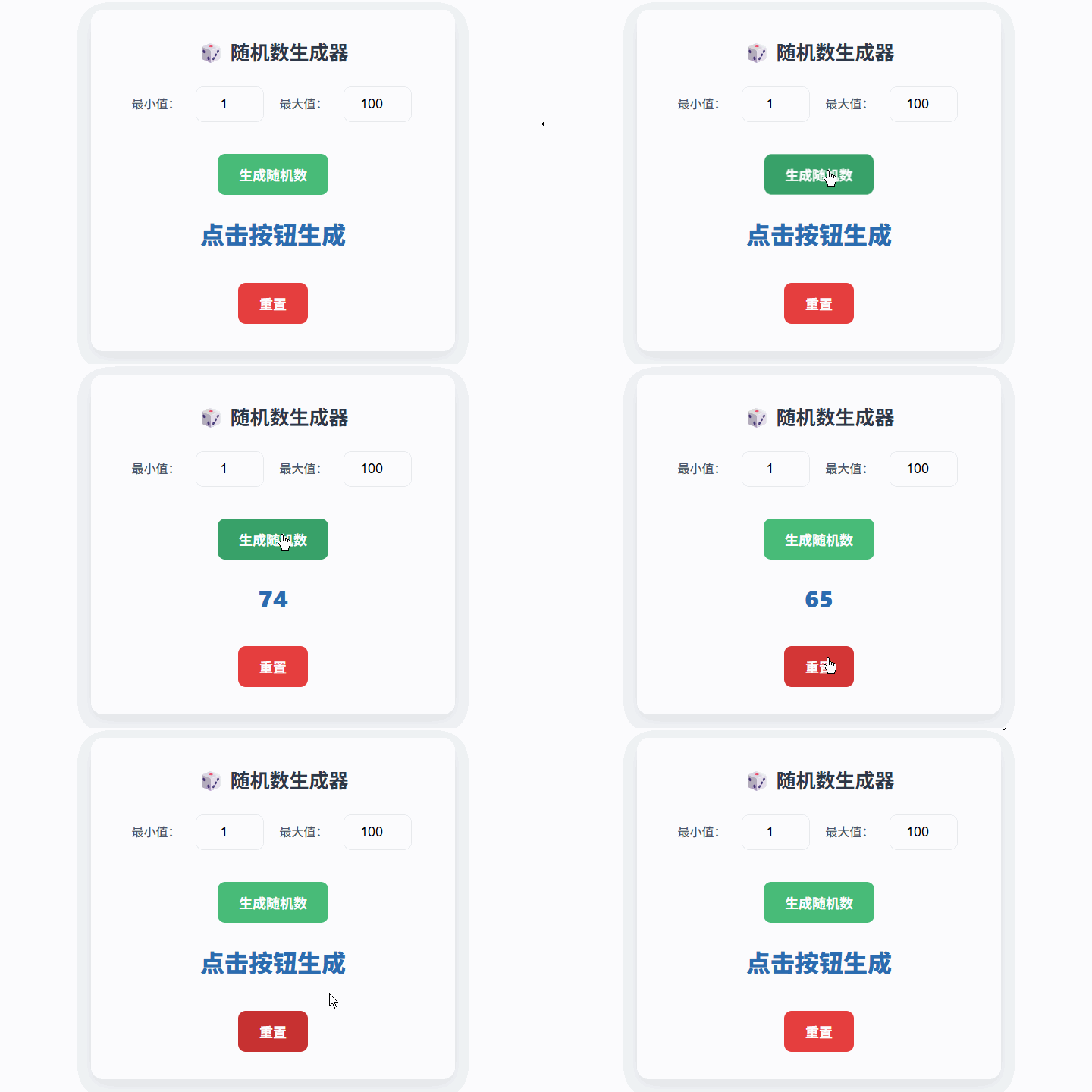
本项目实现一个 区间随机数生成器,具备以下功能:
用户可输入 最小值和 最大值
点击“生成”按钮,在指定范围内输出一个整数
提供“重置”按钮,恢复默认值(1 ~ 100)
自动校验输入:
必须为有效数字
最小值必须 小于 最大值
结果以醒目字体动态显示
<div class="container">
  <h1>随机数生成器</h1>
  <div class="input-section">
    <label for="min">最小值:</label>
    <input type="number" id="min" value="1">

    <label for="max">最大值:</label>
    <input type="number" id="max" value="100">
  </div>

  <button id="generate">生成随机数</button>

  <div class="result">
    <p id="randomNumber">点击按钮生成</p>
  </div>

  <button id="reset">重置</button>
</div>
设计亮点:
使用 <input type="number">:自动限制输入为数字,提升用户体验
默认值设为 1 和 100:符合常见使用场景
语义化标签(<label>):增强无障碍访问能力
* {
  margin: 0;
  padding: 0;
  box-sizing: border-box;
}

body {
  font-family: -apple-system, BlinkMacSystemFont, "Segoe UI", sans-serif;
  display: flex;
  justify-content: center;
  align-items: center;
  min-height: 100vh; /* 修正原文 300vh 错误 */
  background-color: #f5f7fa;
  padding: 20px;
}

.container {
  background: white;
  border-radius: 12px;
  box-shadow: 0 6px 20px rgba(0, 0, 0, 0.08);
  padding: 32px;
  text-align: center;
  width: 100%;
  max-width: 480px;
}

h1 {
  font-size: 24px;
  font-weight: 600;
  margin-bottom: 24px;
  color: #333;
}

.input-section {
  margin-bottom: 24px;
}

input[type="number"] {
  padding: 10px;
  margin: 0 8px;
  width: 80px;
  border: 1px solid #ddd;
  border-radius: 8px;
  font-size: 16px;
  text-align: center;
}

button {
  padding: 12px 24px;
  margin-top: 12px;
  border: none;
  border-radius: 8px;
  font-size: 16px;
  font-weight: 600;
  cursor: pointer;
  transition: all 0.2s ease;
}

#generate {
  background-color: #4CAF50;
  color: white;
}
#generate:hover { background-color: #45a049; }
#generate:active { transform: scale(0.98); }

#reset {
  background-color: #f44336;
  color: white;
}
#reset:hover { background-color: #e53935; }

#randomNumber {
  font-size: 28px;
  font-weight: bold;
  margin: 24px 0;
  color: #2c3e50;
  min-height: 36px; /* 防止布局跳动 */
}// 获取 DOM 元素
const minInput = document.getElementById('min');
const maxInput = document.getElementById('max');
const generateBtn = document.getElementById('generate');
const resetBtn = document.getElementById('reset');
const resultDisplay = document.getElementById('randomNumber');
// 生成随机数
function generateRandomNumber() {
const minVal = parseInt(minInput.value, 10);
const maxVal = parseInt(maxInput.value, 10);
// 输入校验
if (
isNaN(minVal) ||
isNaN(maxVal) ||
minVal >= maxVal
) {
resultDisplay.textContent = "请输入有效的范围(最小值 < 最大值)";
return;
}
// 生成 [min, max] 范围内的整数
const randomNum = Math.floor(
Math.random() * (maxVal - minVal + 1)
) + minVal;
resultDisplay.textContent = randomNum;
}
// 重置表单
function resetForm() {
minInput.value = 1;
maxInput.value = 100;
resultDisplay.textContent = "点击按钮生成";
}
// 绑定事件
generateBtn.addEventListener('click', generateRandomNumber);
resetBtn.addEventListener('click', resetForm);
// 支持回车键快速生成
document.addEventListener('keypress', (e) => {
if (e.key === 'Enter') {
generateRandomNumber();
}
});<!DOCTYPE html>
<html lang="zh-CN">
<head>
<meta charset="UTF-8" />
<meta name="viewport" content="width=device-width, initial-scale=1.0"/>
<title>随机数生成器</title>
<style>
* {
margin: 0;
padding: 0;
box-sizing: border-box;
}
body {
font-family: -apple-system, BlinkMacSystemFont, "Segoe UI", Roboto, sans-serif;
display: flex;
justify-content: center;
align-items: center;
min-height: 100vh;
background-color: #f5f7fa;
padding: 20px;
}
.container {
background: white;
border-radius: 16px;
box-shadow: 0 8px 24px rgba(0, 0, 0, 0.1);
padding: 36px;
text-align: center;
width: 100%;
max-width: 480px;
}
h1 {
font-size: 26px;
font-weight: 700;
margin-bottom: 28px;
color: #2d3748;
}
.input-section {
margin-bottom: 28px;
}
label {
display: inline-block;
margin: 0 6px 8px;
font-weight: 500;
color: #4a5568;
}
input[type="number"] {
padding: 12px;
margin: 0 10px;
width: 90px;
border: 1px solid #e2e8f0;
border-radius: 10px;
font-size: 18px;
text-align: center;
}
button {
padding: 14px 28px;
margin-top: 14px;
border: none;
border-radius: 10px;
font-size: 18px;
font-weight: 600;
cursor: pointer;
transition: all 0.2s;
}
#generate {
background: #48bb78;
color: white;
}
#generate:hover { background: #38a169; }
#generate:active { transform: scale(0.97); }
#reset {
background: #e53e3e;
color: white;
}
#reset:hover { background: #c53030; }
#randomNumber {
font-size: 32px;
font-weight: 800;
margin: 28px 0;
color: #2b6cb0;
min-height: 40px;
}
</style>
</head>
<body>
<div class="container">
<h1>🎲 随机数生成器</h1>
<div class="input-section">
<label for="min">最小值:</label>
<input type="number" id="min" value="1" min="-1000000" max="1000000">
<label for="max">最大值:</label>
<input type="number" id="max" value="100" min="-1000000" max="1000000">
</div>
<button id="generate">生成随机数</button>
<div class="result">
<p id="randomNumber">点击按钮生成</p>
</div>
<button id="reset">重置</button>
</div>
<script>
const minInput = document.getElementById('min');
const maxInput = document.getElementById('max');
const generateBtn = document.getElementById('generate');
const resetBtn = document.getElementById('reset');
const resultDisplay = document.getElementById('randomNumber');
function generateRandomNumber() {
const minVal = parseInt(minInput.value, 10);
const maxVal = parseInt(maxInput.value, 10);
if (
isNaN(minVal) ||
isNaN(maxVal) ||
minVal >= maxVal
) {
resultDisplay.innerHTML = '请确保:<br>最小值 < 最大值,且均为有效数字';
return;
}
const randomNum = Math.floor(
Math.random() * (maxVal - minVal + 1)
) + minVal;
resultDisplay.textContent = randomNum;
}
function resetForm() {
minInput.value = 1;
maxInput.value = 100;
resultDisplay.textContent = "点击按钮生成";
}
generateBtn.addEventListener('click', generateRandomNumber);
resetBtn.addEventListener('click', resetForm);
// 支持回车生成
document.addEventListener('keypress', (e) => {
if (e.key === 'Enter') generateRandomNumber();
});
</script>
</body>
</html>支持小数随机数
// 保留两位小数
const randomFloat = (Math.random() * (max - min) + min).toFixed(2);
生成多个随机数
添加“数量”输入框,返回数组或列表。
历史记录功能
用 <ul> 记录最近 10 次生成结果。
复制结果到剪贴板
navigator.clipboard.writeText(randomNum.toString());动画效果
数字滚动变化(使用 requestAnimationFrame)
Math.floor(Math.random() * (max - min + 1)) + min 是生成闭区间整数的标准方法
必须校验:数值有效性 + min < max
使用 parseInt(..., 10) 避免进制歧义
优先使用 内联提示 而非 alert(),提升 UX
表单重置应恢复初始状态,而非清空
如果用户输入 min = 10, max = 10,当前程序会如何处理?是否合理?应如何改进?
Math.random() 生成的是伪随机数,为什么?在哪些场景下需要加密安全的随机数(如 crypto.getRandomValues())?
如何修改代码,使其能生成 负数范围 的随机数(如 -50 到 50)?现有逻辑是否已支持?
