理解 Unicode 编码 的基本概念及其在文本处理中的重要性
掌握 JavaScript 中 codePointAt() 方法的使用场景与优势
学会构建一个 响应式、用户友好 的 Web 工具应用
区分 charCodeAt() 与 codePointAt() 在处理 辅助平面字符(如 Emoji)时的差异
实践 前端输入校验 与 结果动态展示 的完整交互流程
Unicode 是一套国际标准,旨在为世界上所有书写系统中的每一个字符分配一个唯一的数字编号,称为 码点
为什么需要 Unicode
支持多语言(中文、阿拉伯文、日文、Emoji 等)
跨平台一致显示(Windows、macOS、Linux、手机)
每个字符有唯一标识,避免乱码
例如:
'A' → U+0041(十进制:65)
'中' → U+4E2D(十进制:20013)
'😊' → U+1F60A(十进制:128522)
Unicode 码点通常以
U+开头后接十六进制数表示,但程序中常使用十进制整数。
const str = "😊";

console.log(str.charCodeAt(0));     // 55357 (高位代理,无意义)
console.log(str.charCodeAt(1));     // 56842 (低位代理)

console.log(str.codePointAt(0)); // 128522 正确的 Unicode 码点因此,现代开发应优先使用
codePointAt()。
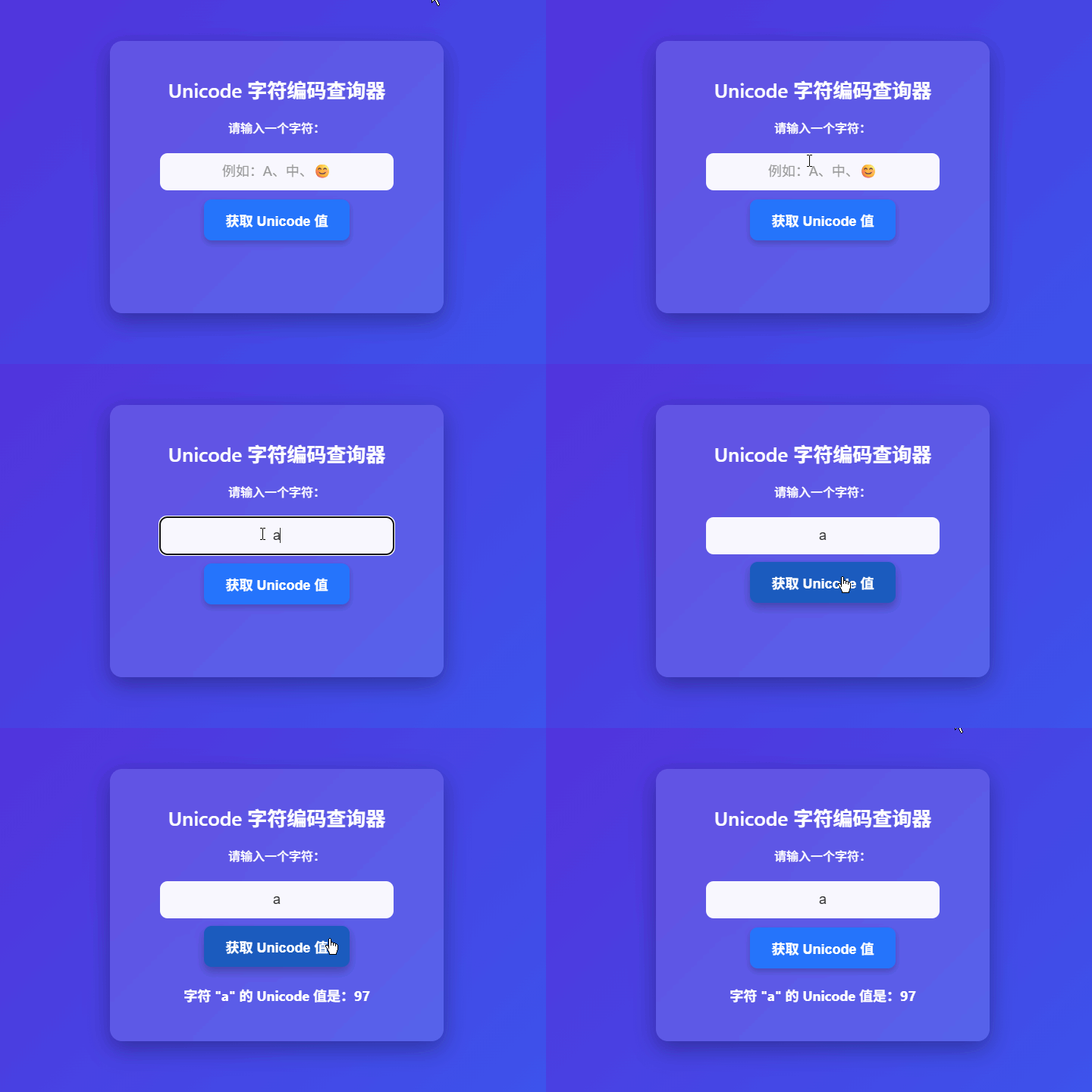
本项目实现一个 Unicode 编码查询工具,具备以下功能:
用户在输入框中输入任意字符(支持单字、多字、Emoji)
点击“获取 Unicode 值”按钮
程序提取第一个字符,计算其 Unicode 码点(十进制)
在页面下方显示结果,格式为:
“字符
"X"的 Unicode 值是:12345”
注意:虽然输入框允许多字符,但仅处理第一个字符,符合常见使用场景(如查单个符号编码)。
<div class="container">
  <h1>Unicode 字符编码查询器</h1>
  <label for="charInput">请输入一个字符:</label>
  <input
    type="text"
    id="charInput"
    maxlength="100"
    placeholder="例如:A 或 😊"
  >
  <button id="getUnicode">获取 Unicode 值</button>
  <p id="output"></p>
</div>
关键设计点
maxlength="100":防止用户粘贴超长文本(虽只取首字符,但限制更合理)
placeholder 提供示例,引导用户输入
<label> 绑定 for 属性,提升无障碍访问
body {
  margin: 0;
  padding: 0;
  font-family: -apple-system, BlinkMacSystemFont, "Segoe UI", sans-serif;
  background: linear-gradient(to right, #6a11cb, #2575fc);
  color: white;
  display: flex;
  justify-content: center;
  align-items: center;
  min-height: 100vh;
}
.container {
  text-align: center;
  background: rgba(255, 255, 255, 0.1);
  backdrop-filter: blur(4px); /* 可选:毛玻璃效果 */
  border-radius: 12px;
  padding: 24px;
  width: 90%;
  max-width: 420px;
  box-shadow: 0 8px 20px rgba(0, 0, 0, 0.25);
}
input[type="text"] {
  width: 80%;
  padding: 12px;
  border: none;
  border-radius: 8px;
  margin: 12px 0;
  font-size: 16px;
  text-align: center;
  background: rgba(255, 255, 255, 0.9);
}
button {
  background: #2575fc;
  color: white;
  border: none;
  padding: 12px 24px;
  border-radius: 8px;
  font-size: 16px;
  font-weight: 600;
  cursor: pointer;
  transition: background 0.2s;
}
button:hover {
  background: #1b5bbf;
}
#output {
  margin-top: 20px;
  font-size: 18px;
  font-weight: bold;
  min-height: 24px; /* 防止布局跳动 */
}
视觉亮点
渐变背景 + 半透明卡片,现代感强
按钮悬停反馈,提升交互体验
输入框白色背景,确保文字清晰可读
document.getElementById('getUnicode').addEventListener('click', function () {
  const input = document.getElementById('charInput').value.trim();
  const outputEl = document.getElementById('output');

  if (input.length === 0) {
    outputEl.textContent = "请输入至少一个字符。";
    return;
  }

  const firstChar = input[0];
  const unicodeValue = firstChar.codePointAt(0);

  outputEl.textContent = `字符 "${firstChar}" 的 Unicode 值是:${unicodeValue}`;
});<!DOCTYPE html>
<html lang="zh-CN">
<head>
<meta charset="UTF-8" />
<meta name="viewport" content="width=device-width, initial-scale=1.0"/>
<title>Unicode 字符编码查询器</title>
<style>
* {
box-sizing: border-box;
}
body {
margin: 0;
padding: 0;
font-family: -apple-system, BlinkMacSystemFont, "Segoe UI", Roboto, sans-serif;
background: linear-gradient(135deg, #6a11cb, #2575fc);
color: white;
display: flex;
justify-content: center;
align-items: center;
min-height: 100vh;
padding: 20px;
}
.container {
text-align: center;
background: rgba(255, 255, 255, 0.12);
backdrop-filter: blur(6px);
border-radius: 16px;
padding: 28px;
width: 90%;
max-width: 440px;
box-shadow: 0 10px 30px rgba(0, 0, 0, 0.3);
}
h1 {
font-size: 26px;
margin-bottom: 20px;
font-weight: 600;
}
label {
display: block;
margin-bottom: 10px;
font-weight: 500;
}
input[type="text"] {
width: 80%;
padding: 14px;
border: none;
border-radius: 10px;
margin: 12px 0;
font-size: 18px;
text-align: center;
background: rgba(255, 255, 255, 0.95);
color: #333;
}
input::placeholder {
color: #999;
}
button {
background: #2575fc;
color: white;
border: none;
padding: 14px 28px;
border-radius: 10px;
font-size: 18px;
font-weight: 600;
cursor: pointer;
transition: all 0.25s ease;
box-shadow: 0 4px 8px rgba(0, 0, 0, 0.2);
}
button:hover {
background: #1b5bbf;
transform: translateY(-2px);
box-shadow: 0 6px 12px rgba(0, 0, 0, 0.25);
}
#output {
margin-top: 24px;
font-size: 18px;
font-weight: bold;
min-height: 26px;
line-height: 1.4;
}
</style>
</head>
<body>
<div class="container">
<h1>Unicode 字符编码查询器</h1>
<label for="charInput">请输入一个字符:</label>
<input
type="text"
id="charInput"
maxlength="100"
placeholder="例如:A、中、😊"
autofocus
>
<button id="getUnicode">获取 Unicode 值</button>
<p id="output"></p>
</div>
<script>
document.getElementById('getUnicode').addEventListener('click', function () {
const rawInput = document.getElementById('charInput').value;
const input = rawInput.trim();
const outputEl = document.getElementById('output');
if (input.length === 0) {
outputEl.textContent = "请输入至少一个字符。";
return;
}
const firstChar = input[0];
const unicodeValue = firstChar.codePointAt(0);
outputEl.textContent = `字符 "${firstChar}" 的 Unicode 值是:${unicodeValue}`;
});
// 支持回车键触发
document.getElementById('charInput').addEventListener('keypress', function (e) {
if (e.key === 'Enter') {
document.getElementById('getUnicode').click();
}
});
</script>
</body>
</html>
显示十六进制格式
const hex = unicodeValue.toString(16).toUpperCase();
// 显示为 U+1F60A
批量处理多个字符
遍历字符串,输出每个字符的编码:
Array.from(input).forEach((char, i) => {
  console.log(`[${i}] "${char}" → ${char.codePointAt(0)}`);
});反向查询:输入 Unicode 值,输出对应字符
String.fromCodePoint(128522); // "😊"复制结果到剪贴板
添加“复制”按钮,方便开发者使用。
codePointAt(0) 是获取 Unicode 码点的正确方法
支持 所有 Unicode 字符,包括 Emoji、中文、特殊符号
前端工具应注重 用户体验(提示、反馈、快捷键)
输入需做 基础校验(非空、去空格)
界面设计应 简洁美观、响应式适配
如果用户输入两个 Emoji(如 "😊❤️"),当前程序会返回哪个字符的编码?为什么?
String.fromCodePoint(65) 会返回什么?如何用它实现“Unicode 值 → 字符”的反向转换?
为什么 charCodeAt() 对 Emoji 返回的是 55357 而不是 128522?这与 UTF-16 编码机制有何关系?
