掌握使用原生 HTML/CSS/JS 构建交互式 Web 应用的基本流程
理解 DOM 元素获取与内容更新的核心方法
学会通过变量管理应用状态(如计数值和点击次数)
实现按钮事件响应与界面同步更新
应用条件逻辑控制数值边界和重置行为
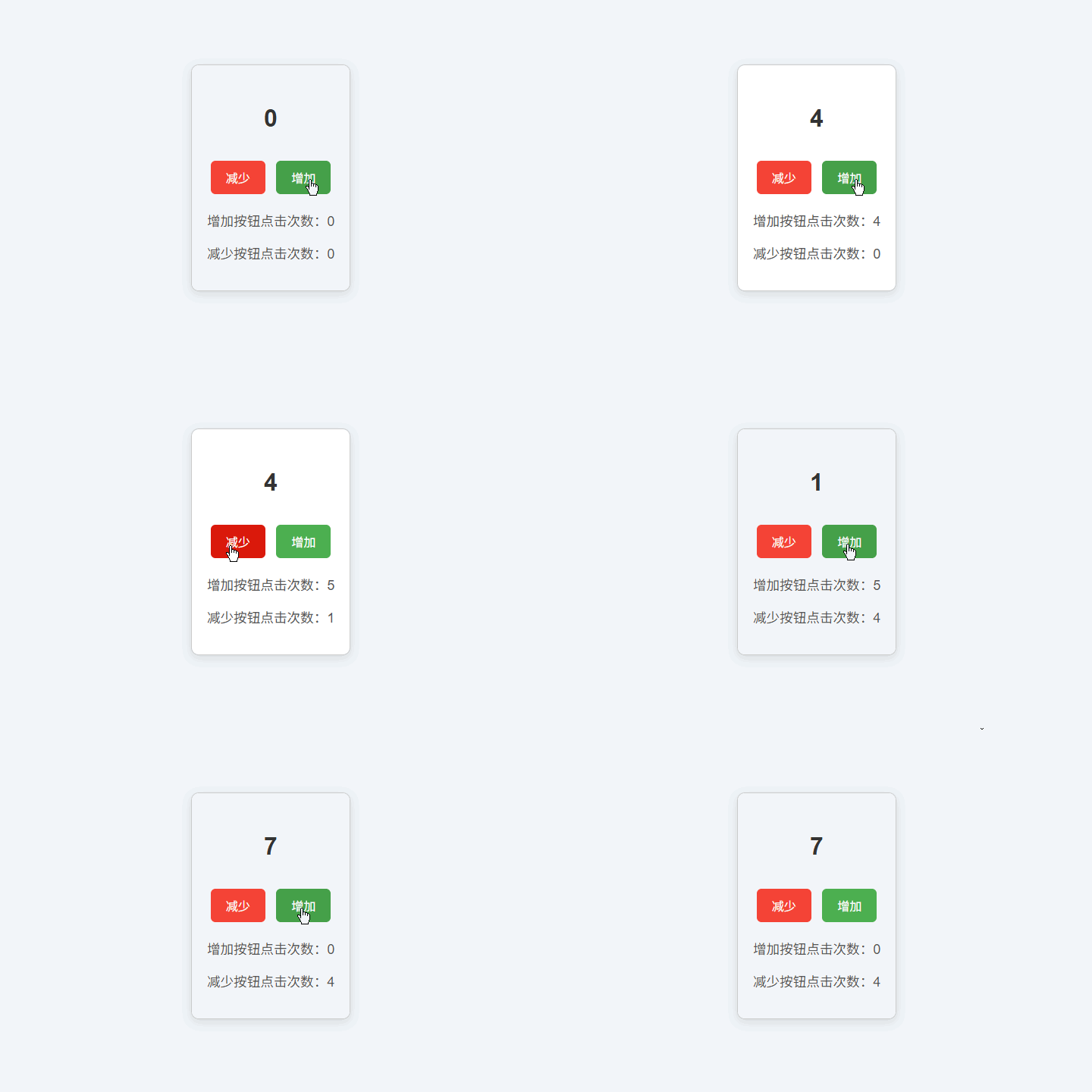
我们将构建一个简易计数器应用,具备以下功能:
显示当前计数值(初始为 0)
提供【增加】和【减少】按钮
分别记录“增加”和“减少”按钮的点击次数
当任一按钮点击达到 10 次时,自动将该计数重置为 0
计数值不能低于 0
<div class="container">
  <div class="counter">
    <p id="count">0</p>
  </div>
  <div>
    <button onclick="dec()">减少</button>
    <button onclick="inc()">增加</button>
  </div>
  <div class="clicks">
    <p>增加按钮点击次数:<span id="incCount">0</span></p>
    <p>减少按钮点击次数:<span id="decCount">0</span></p>
  </div>
</div>
结构说明:
.container:整体容器,用于居中布局
#count:显示主计数值
两个 <button>:分别绑定 inc() 和 dec() 函数
#incCount 与 #decCount:分别记录两类操作的点击次数
所有可变内容均通过
id标识,便于 JavaScript 获取和更新
body {
  font-family: Arial, sans-serif;
  display: flex;
  justify-content: center;
  align-items: center;
  height: 100vh;
  margin: 0;
  background-color: #f0f4f8;
}

.container {
  text-align: center;
  padding: 20px;
  border: 1px solid #ccc;
  border-radius: 10px;
  background-color: #fff;
  box-shadow: 0 4px 12px rgba(0, 0, 0, 0.1);
}

.counter {
  font-size: 2em;
  margin-bottom: 20px;
  font-weight: bold;
  color: #333;
}

button {
  padding: 10px 20px;
  font-size: 1em;
  margin: 5px;
  cursor: pointer;
  border: none;
  border-radius: 6px;
  background-color: #4CAF50;
  color: white;
  transition: background-color 0.2s;
}

button:hover {
  background-color: #45a049;
}

button:first-of-type {
  background-color: #f44336;
}

button:first-of-type:hover {
  background-color: #da190b;
}

.clicks {
  font-size: 1.1em;
  margin-top: 15px;
  color: #555;
}页面整体垂直水平居中
卡片式设计 + 圆角 + 阴影,提升视觉层次
【增加】按钮为绿色,【减少】按钮为红色,符合用户直觉
悬停效果增强交互反馈
// 初始化状态变量
let countValue = 0;          // 主计数值
let incrementClicks = 0;     // 增加按钮点击次数
let decrementClicks = 0;     // 减少按钮点击次数

// 获取 DOM 元素引用
const countElement = document.getElementById("count");
const incCountElement = document.getElementById("incCount");
const decCountElement = document.getElementById("decCount");

// 增加操作
function inc() {
  countValue++;
  incrementClicks = incrementClicks >= 10 ? 0 : incrementClicks + 1;
  updateUI();
}

// 减少操作
function dec() {
  if (countValue > 0) {
    countValue--;
  }
  decrementClicks = decrementClicks >= 10 ? 0 : decrementClicks + 1;
  updateUI();
}

// 更新界面
function updateUI() {
  countElement.textContent = countValue;
  incCountElement.textContent = incrementClicks;
  decCountElement.textContent = decrementClicks;
}
逻辑解析:
<!DOCTYPE html>
<html lang="zh-CN">
<head>
  <meta charset="UTF-8" />
  <meta name="viewport" content="width=device-width, initial-scale=1.0"/>
  <title>简易计数器</title>
  <style>
    body {
      font-family: Arial, sans-serif;
      display: flex;
      justify-content: center;
      align-items: center;
      height: 100vh;
      margin: 0;
      background-color: #f0f4f8;
    }
    .container {
      text-align: center;
      padding: 20px;
      border: 1px solid #ccc;
      border-radius: 10px;
      background-color: #fff;
      box-shadow: 0 4px 12px rgba(0, 0, 0, 0.1);
    }
    .counter {
      font-size: 2em;
      margin-bottom: 20px;
      font-weight: bold;
      color: #333;
    }
    button {
      padding: 10px 20px;
      font-size: 1em;
      margin: 5px;
      cursor: pointer;
      border: none;
      border-radius: 6px;
      transition: background-color 0.2s;
    }
    button:nth-of-type(2) {
      background-color: #4CAF50;
      color: white;
    }
    button:nth-of-type(2):hover {
      background-color: #45a049;
    }
    button:nth-of-type(1) {
      background-color: #f44336;
      color: white;
    }
    button:nth-of-type(1):hover {
      background-color: #da190b;
    }
    .clicks {
      font-size: 1.1em;
      margin-top: 15px;
      color: #555;
    }
  </style>
</head>
<body>
  <div class="container">
    <div class="counter">
      <p id="count">0</p>
    </div>
    <div>
      <button onclick="dec()">减少</button>
      <button onclick="inc()">增加</button>
    </div>
    <div class="clicks">
      <p>增加按钮点击次数:<span id="incCount">0</span></p>
      <p>减少按钮点击次数:<span id="decCount">0</span></p>
    </div>
  </div>

  <script>
    let countValue = 0;
    let incrementClicks = 0;
    let decrementClicks = 0;

    const countElement = document.getElementById("count");
    const incCountElement = document.getElementById("incCount");
    const decCountElement = document.getElementById("decCount");

    function inc() {
      countValue++;
      incrementClicks = incrementClicks >= 10 ? 0 : incrementClicks + 1;
      updateUI();
    }

    function dec() {
      if (countValue > 0) countValue--;
      decrementClicks = decrementClicks >= 10 ? 0 : decrementClicks + 1;
      updateUI();
    }

    function updateUI() {
      countElement.textContent = countValue;
      incCountElement.textContent = incrementClicks;
      decCountElement.textContent = decrementClicks;
    }
  </script>
</body>
</html>添加“重置全部”按钮:一键将计数值和点击次数清零
限制最大计数值:例如不允许超过 100
本地存储:使用 localStorage 保存计数状态,刷新页面不丢失
动画效果:用 CSS 过渡让数字变化更平滑
键盘支持:按 + / - 键也能操作计数器
使用 document.getElementById() 获取 DOM 元素是操作页面内容的基础
通过变量保存应用状态,并通过函数统一更新界面
事件绑定可通过 HTML 的 onclick 属性快速实现(适合小型项目)
条件重置逻辑(如点击 10 次后归零)体现了状态管理的常见模式
良好的 UI/UX 设计能显著提升用户体验(颜色、间距、反馈)
如果将 onclick 改为在 JavaScript 中使用 addEventListener 绑定,代码应如何重构?这样做有什么优势?
当前减少操作不会让计数变为负数,但增加操作没有上限。如何为计数器添加最大值限制(例如 50)?
为什么我们在 updateUI() 中一次性更新所有元素,而不是在 inc() 和 dec() 中分别更新?这种设计有什么好处?
